
Engineering noteResearch & Engineering
Part of: AWS
How TEEI Turns Amazon Chime SDK Events into Verified Hours
TEEI's free programmes run on Amazon Chime SDK, and every verified volunteer hour, up to the company report in Evenhall, starts as a meeting event.
The programme
On this page
- At a glance
- One room layer, several programmes
- Built for everyday life in Ukraine
- Interaction and captions in the same meeting
- From meeting event to verified hour
- Evenhall: the company report
- How it all connects
- How Amazon Chime SDK connects to the rest of AWS
- The test room: every room, opened in its roles
- What this means for TEEI’s work
- Frequently asked questions
TEEI’s free programmes connect people from Ukraine, and women from Latin America and the Caribbean, with volunteers who help them practise a language and build a career. In TEEI Language, Skills Academy and TEEI Mentorship, every live conversation runs on Amazon Chime SDK, and every verified volunteer hour starts as a meeting event, not a calendar entry.
A calendar booking says that two people planned to meet. It does not say that they did. For TEEI, a nonprofit, that gap matters: volunteers want their hours to count, programmes report what happened, and companies whose employees volunteer with us need figures they can stand behind.
So we built our record of participation on the meeting itself. The three programmes share our own platform, and when someone joins or leaves one of its rooms, the SDK emits an event. Events become connected time, connected time becomes a settled session, and settled sessions become the verified hours that learners, volunteers and companies see. Each number can be traced back to what happened in a meeting.
This article follows that path, from the practice room to the company report, and then opens up the AWS architecture underneath: how Amazon Chime SDK connects to the other AWS services we run, and the settings we chose. It ends in a test room where you can open every room in its roles.
Built by volunteers, supported by companies. TEEI’s software platforms are built through volunteer work, with NOK 0 spent on paid software development. Companies support this work through cloud credits, sponsored services, technology and technical support. Infrastructure and third-party costs are separate from the software development figure.
At a glance
| Part of TEEI | What happens there | What Amazon Chime SDK provides |
|---|---|---|
| TEEI Language | One-to-one practice, Speaking Clubs and other group practice | Meetings, audio and video, Voice Focus, data messages, live transcription |
| TEEI Language Courses | Teacher-led online group classes, two to three sessions a week, with materials and assignments in itslearning | Nothing yet: the platform has no Amazon Chime SDK room for these classes |
| Skills Academy | Live workshops, clinics, expert Q&A, webinars and classes | Group meetings, and per-attendee capabilities that decide who may speak |
| TEEI Mentorship | One-to-one and group mentoring | The same rooms, under Mentorship’s own words and rules |
| TEEI Meetings | Private meetings with invited guests | Attendee capabilities for hosts, speakers and listeners |
| Evenhall by TEEI | Companies organise employee volunteering and reporting | Meeting events, from which TEEI builds the participation record |
One room layer, several programmes
TEEI’s programmes form one path, from language to skills to mentorship, and a person can start at any step. Each programme looks different to the people in it. TEEI Language matches learners with volunteers. Skills Academy publishes classes, enrols participants and decides who teaches. TEEI Mentorship matches mentees with mentors and has its own journey and vocabulary. Matching, booking, enrolment, class administration and certificate rules are TEEI’s own software.
The conversation is shared. Every programme uses the Amazon Chime SDK client library for JavaScript and the meeting APIs directly, so the room is a page in our product rather than a link to another app. People open it from their own TEEI page, check camera and microphone in a lobby, and talk. If the other person does not arrive, the room says so and shows the way back.

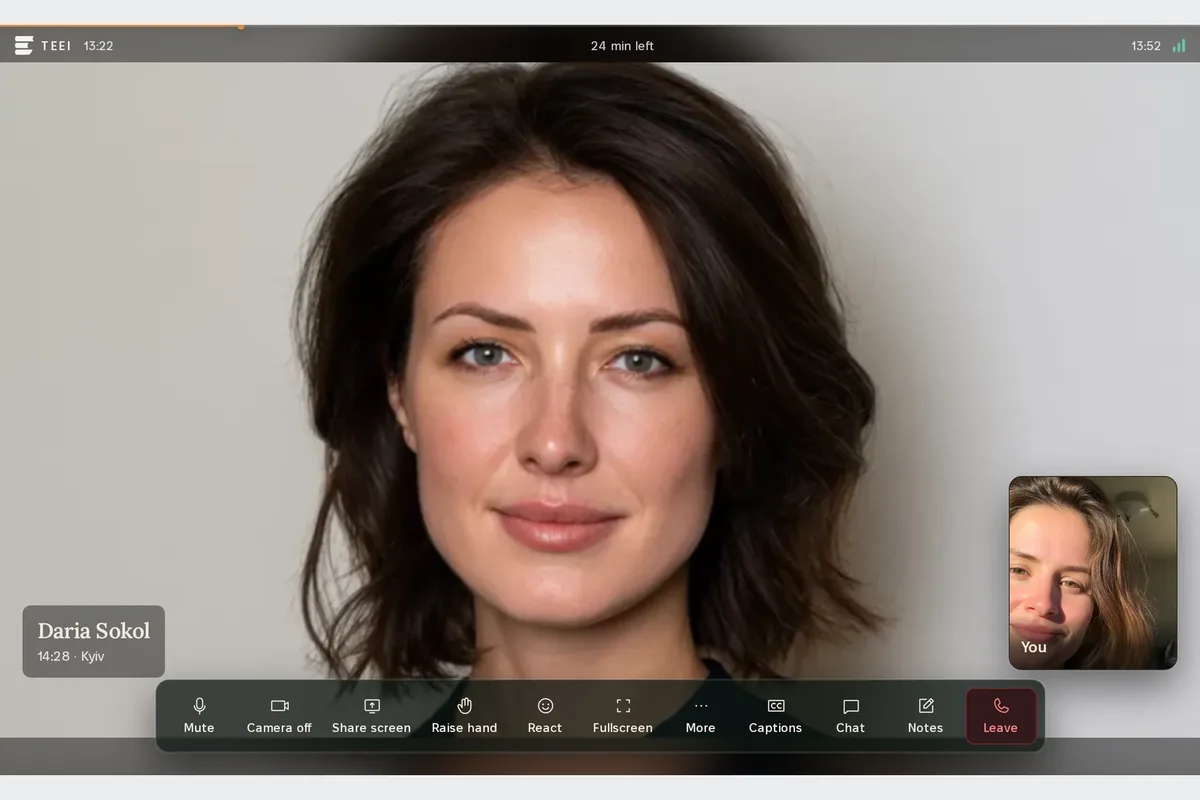
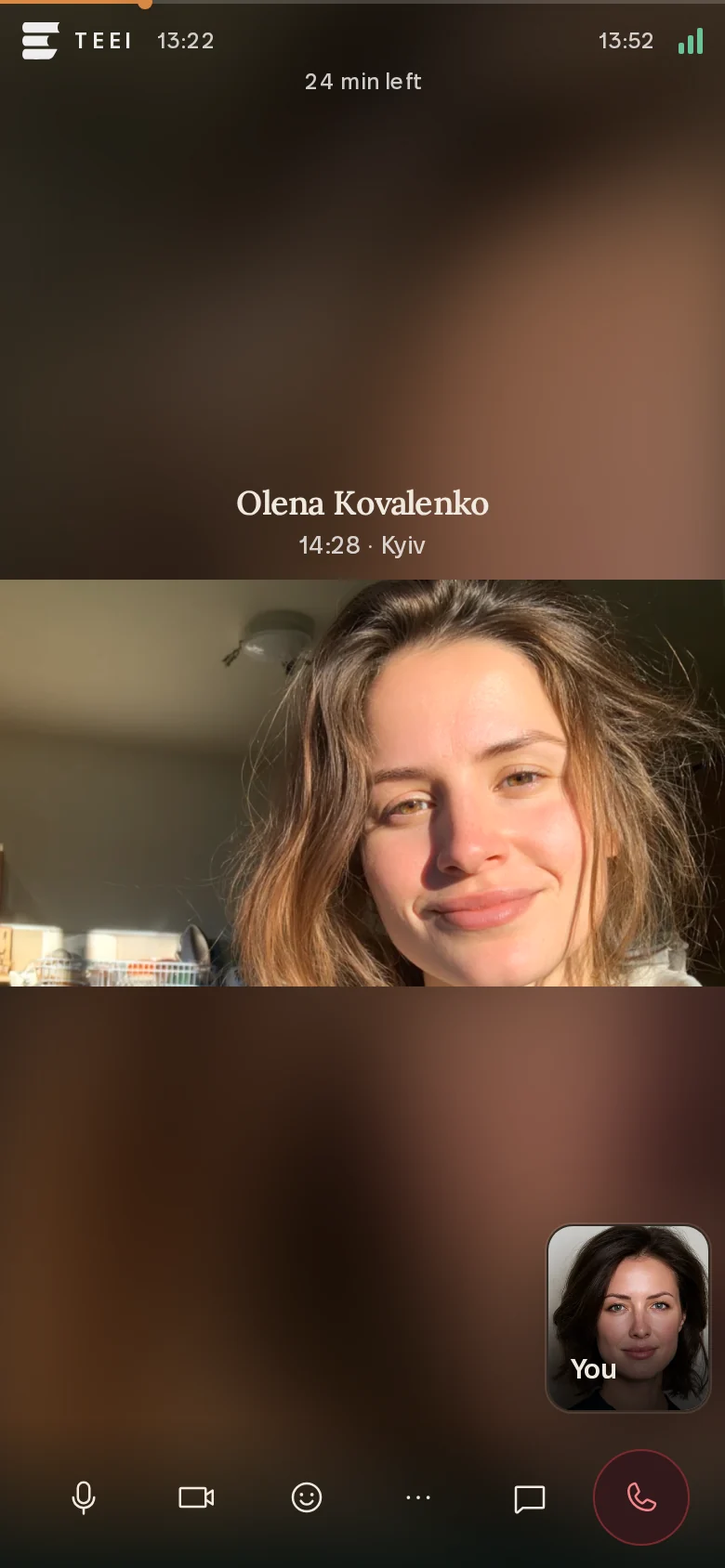
The one-to-one room is the same in TEEI Language and TEEI Mentorship; only the words, labels and programme rules change.

The room is the same; what happens in it belongs to the two people. In TEEI Language, a volunteer often opens with something easy to talk about.
In TEEI Mentorship, the same room starts from the mentee’s question.
Volunteers also share their own careers in short films for TEEI Mentorship. Dana A., who works at AWS, taught herself to code.
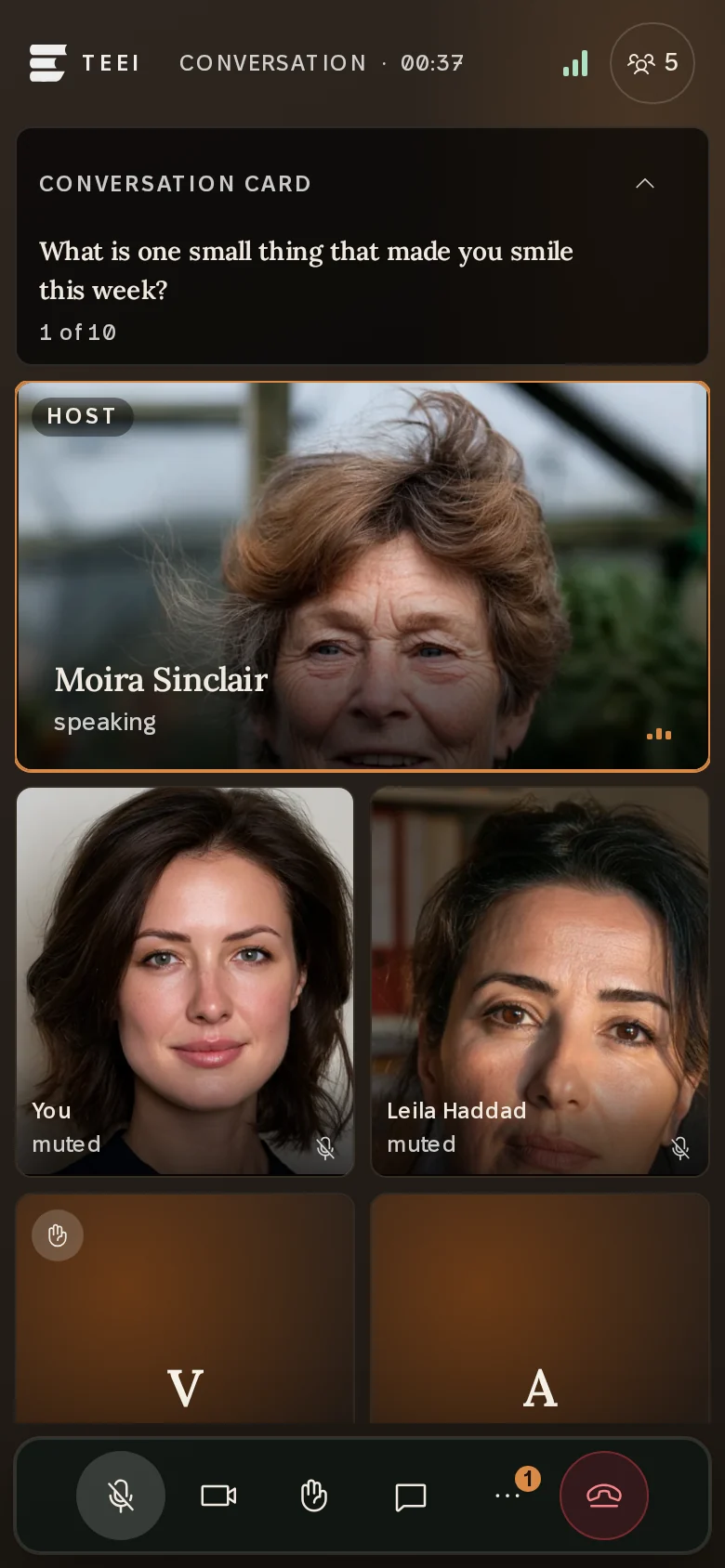
The group room carries Speaking Clubs, group mentoring and Skills Academy’s live sessions. It uses the SDK’s attendee presence, volume indicator and active speaker detection to show who is there and who is talking, with up to 25 videos at once, the SDK’s default for a meeting. Our application adds the host’s tools: conversation cards, raised hands in order, a spotlight and an invitation to speak.

In Skills Academy, volunteers with professional skills teach live: one-off workshops, clinics, expert Q&A sessions and webinars, and classes that meet weekly for two to six sessions. Its self-paced study on DataCamp and Coursera takes place on those platforms, not in our rooms. One sign-in carries a person into Skills Academy from TEEI Language or TEEI Mentorship. Instructors who apply on their own are approved before they teach, while a colleague a company sends creates and teaches on topics they choose. Participants enrol, and a class certificate follows when the teaching team confirms attendance and reviewed work.
In these sessions, the SDK does more than carry media. Each session records who is host, co-host, moderator or speaker, and everyone else listens. In presentation and panel formats such as a webinar, our backend uses attendee capabilities so that a listener receives audio without sending it, and UpdateAttendeeCapabilities lets a host invite someone to speak and return them to listening. A host can also remove a participant or end the meeting. Workshops, clinics and classes are built for conversation, so everyone in them can speak. Presenting and screen sharing follow the same roles in the room. TEEI Meetings, where staff meet invited guests who join from a personal link without an account, uses the same mechanism: a webinar listener receives audio, video and shared content and sends none of them.

Built for everyday life in Ukraine
For many of our participants in Ukraine, a power cut or a phone switching networks mid-sentence is part of an ordinary day. That is why our configuration starts from speech and from coming back.
When we measured our own production calls, the main problem was packet loss, not latency. So we use the SDK’s speech audio profile with redundancy, which sends extra copies of the audio so the listener can recover lost packets: a lesson can survive losing the picture, but not losing the voice. We allow five minutes to reconnect instead of the default two, so a conversation interrupted by a power cut or a network handover continues when the person returns, rather than starting over. Each device receives the video its connection can carry, and TEEI never turns anyone’s camera off automatically.
Noise matters as much as loss. Amazon Voice Focus reduces background noise in the browser, and every meeting requests echo reduction, which helps when someone listens through laptop speakers in a shared room. A control in the room switches Voice Focus on wherever the browser supports it, and background blur lets someone take part without showing their home.
Interaction and captions in the same meeting
Someone wants to type a word they cannot pronounce yet, show a CV or signal that they have something to say. Chat, raised hands, reactions and muted or away signals travel as real-time data messages beside the call, each carrying a topic and up to 2 KB of data to everyone in the meeting. Screen sharing uses the SDK’s content share.
In the one-to-one room, either person can ask for live captions through Amazon Chime SDK live transcription. Captions start once the other agrees, and either can turn them off. Our sessions are often not in English, so Amazon Transcribe identifies the spoken language itself. It recognises the language; it does not translate. Captions show a learner how a word they just heard is spelt. After the call, the learner can save the transcript to their own account; otherwise TEEI keeps no copy.
From meeting event to verified hour
Behind every room sit three lanes we keep apart. Access is our decision: our backend checks that a person belongs in that room at that time before Amazon Chime SDK is asked to let them in. Media is the SDK’s: audio and video go straight between browsers and the media service, never through our servers. Attendance is the record: meeting events arrive on their own path, after the fact, so a slow record never slows a call.

Amazon Chime SDK publishes an event when someone joins, leaves or drops and when a meeting ends. TEEI’s rules take it from there. We combine each person’s events into connected time and work out how long people were connected together. After the session, we settle it: a one-to-one session is completed when both people shared at least five minutes. Missing events make a session unknown, never a no-show, because a missing signal is not proof that someone stayed away. Hours come from measured time in the room, not from the length of the booking.
By 14 October 2026, 1,440 one-to-one sessions on the platform had been settled as completed this way: 109 in July, 398 in August, 670 in September and 263 in the first two weeks of October. Connected time shows that someone took part by the platform’s rules; it does not measure attention or learning.
Counted in minutes instead of sessions, across every meeting in our account, one-to-one and group, Amazon Chime SDK recorded 142,536 attendee-minutes from 1 July to 13 October 2026. An attendee-minute is one person connected to a meeting for one minute. Use grew almost every week, from 215 in the first full week of July to 17,036 in the week from 21 September.

Evenhall: the company report
Evenhall by TEEI is the workspace companies use to take part in TEEI’s programmes, and it has no video of its own. A company applies, and once TEEI has reviewed the application, its managers invite employees into TEEI Language, Skills Academy or TEEI Mentorship. Employees sign up on the programme platform and take part there, as conversation partners, mentors or instructors, in the same rooms as everyone else.
What Evenhall adds is the company’s view: who took part, how much time they gave, and reports a manager can prepare for leadership. It reads that participation from the programme platforms in a nightly sync. For one-to-one sessions, an employee’s verified hours are the shared time from sessions settled as completed; for a Skills Academy instructor, the measured time in the room, capped at the scheduled length. Where no measurement exists, such as a host’s own time in a group session, Evenhall credits no hours rather than estimating them. The dashboards are TEEI’s software; the hours in them start as meeting events.
How it all connects
Put together, the parts form one logical journey:
Evenhall → TEEI programmes → Amazon Chime SDK → recorded participation → programme history and reporting
It is not one synchronous chain. The meeting happens live, the record is settled after the session, and Evenhall reads it overnight. No step waits for the next, and no dashboard sits between two people who are talking.

The participant. A learner from Ukraine books a time with a volunteer in TEEI Language, opens the room from their TEEI page, practises with captions on, and leaves. The meeting events become a completed session in their history. When they move on to a live Skills Academy class or to a mentor in TEEI Mentorship, each session is recorded the same way, and class attendance counts towards the class certificate.
The company. A manager invites an employee from Evenhall. The employee becomes a mentor in TEEI Mentorship and starts meeting a mentee. Each conversation runs on Amazon Chime SDK and is settled by the same rules as every other session. After the nightly sync, Evenhall shows the employee’s verified hours, and the manager prepares a report. The company never sees the conversation, only the record that it took place.
How Amazon Chime SDK connects to the rest of AWS
The sections above follow a session from the room to the report. This one is for readers who build on AWS: which services sit around each room, where they run, and why we set them up this way. Unless we say otherwise, it describes what production runs today.

| AWS service | What it does for a room |
|---|---|
| Europe (Ireland): the entrance and the media | |
| Amazon API Gateway (HTTP API) | The one entrance from our backend into AWS, throttled and guarded by a Lambda authorizer |
| Amazon Chime SDK meetings, media | Hosts the meeting itself: audio, video, screen sharing and data messages between browsers |
| Amazon Transcribe | Live captions, called by Amazon Chime SDK itself |
| AWS X-Ray | Traces the authorizer and the meeting function |
| Europe (Frankfurt): meeting control and events | |
| Amazon Chime SDK meetings, control | Creates meetings and attendees, changes what an attendee may send, starts captions and publishes meeting events |
| Amazon EventBridge | Receives meeting events on the default event bus and routes them by two independent rules |
| Amazon SQS | Dead-letter queues for events that could not be delivered |
| Amazon S3 | A separate receipt of eight kinds of meeting event, kept for 30 days |
| In both Regions | |
| AWS Lambda | In Ireland, the authorizer and the meeting function; in Frankfurt, event forwarding, replay of failed events, receipts and an hourly canary |
| AWS Secrets Manager | The secrets that authenticate calls between our backend and AWS, in both directions |
| Amazon CloudWatch | Alarms on failed joins, rejected requests, failed deliveries and a silent event path |
Grouped by the Region it runs in.
Two Regions, and why
Amazon Chime SDK splits a meeting into a control plane, the API that creates and changes meetings, and a media plane, where the meeting itself runs. The two do not have to be in the same Region. Europe (Ireland) hosts meeting media but has no meetings control endpoint, so our meeting function in Ireland calls the control API in Europe (Frankfurt) and asks for every meeting’s media to be hosted in Ireland, close to our participants. Both Regions are in the EU (Regions for Amazon Chime SDK meetings).
The control Region decides more than where an API call lands. A meeting can only be updated in the control Region that created it, and its events are delivered in that Region as well (choosing a control Region). That is why our whole attendance lane, from the EventBridge rule to the dead-letter queue, runs in Frankfurt, while the API our backend calls runs in Ireland. A separate test environment uses Europe (London) as its control Region, so test meetings and their events never mix with production’s.
Join, step by step
Pressing Join sets off six steps:
- Our backend decides. The Cloudflare Worker checks that the person belongs to the booking, that the booking is inside its join window and, for a volunteer or mentor, that they are still approved. Loading the page never creates a meeting. A Join request does, and so can a warm-up job that prepares the meeting shortly before a session starts, if it has none yet.
- One meeting per booking. Whichever comes first, a Join or the warm-up job, creates the meeting under a 60-second lease, so two people who press Join at the same moment cannot create two meetings. The meeting ID is stored with the booking, and every later Join, including a reconnect, reuses it. Amazon Chime SDK ends a meeting after five continuous minutes with nobody connected (Amazon Chime SDK FAQ). If that has happened, the next Join creates a new meeting and our backend reconciles the booking with it.
- Short-lived, narrow access. The backend grants short-lived access to one authorised meeting, either to join it or to host it. Server code chooses which, and nothing the browser sends can raise it.
- API Gateway and the authorizer. The request reaches a throttled Amazon API Gateway HTTP API, where a separate authorizer validates it before the meeting function acts.
- The meeting function checks again. An AWS Lambda function compares the request with what was granted: ending a meeting, removing an attendee and changing capabilities all need the host capability. Then it calls the Amazon Chime SDK Meetings API: GetMeeting to reuse a meeting, CreateMeeting if there is none, then CreateAttendee.
- The browser connects. After authorisation, the browser connects directly to the meeting’s media service in Ireland. No AWS credentials ever reach the browser.
Both functions run on Node.js 22 on Arm-based AWS Graviton processors, with AWS X-Ray tracing. One instance of each is kept warm with provisioned concurrency, so the first Join of the morning does not wait for a cold start.
The identifiers the meeting service receives carry no personal data. The external meeting ID is the booking’s generated identifier, and the user ID is pseudonymous; the meeting function refuses any user ID that is not one.
The call that creates a meeting is short. This is the CreateMeeting request in our meeting function, with its comment shortened:
const created = await chime.send(
  new CreateMeetingCommand({
    ClientRequestToken: clientRequestToken ?? buildClientRequestToken(bookingId),
    ExternalMeetingId: bookingId.slice(0, 64),
    MediaRegion: mediaRegion,
    // Machine-learning echo reduction. It must be requested here, at meeting
    // creation: a client cannot opt into it later.
    MeetingFeatures: {
      Audio: { EchoReduction: 'AVAILABLE' },
    },
  }),
);
Echo reduction is the one meeting feature we request. Everything else, from capabilities to captions, can change while the meeting runs.
Retries are split on purpose. Our backend makes up to four attempts at a failed call, with full-jitter backoff that starts at 400 milliseconds and is capped at 4 seconds, on network errors, throttling and server errors. The one call it never repeats is a fresh CreateMeeting: a request that timed out may still have created a meeting, and a second attempt could create another. Attendee calls are safe to repeat. Inside the function, the AWS SDK uses its adaptive retry mode with up to three attempts.
The same HTTP API is not only for meetings. Behind the same authorizer and the same kind of signed token, it serves more than twenty other routes for the programmes, from image uploads to Amazon S3 to features built on Amazon Bedrock. They are separate functions and take no part in a call.
In the browser
The rooms use version 3.32.0 of the Amazon Chime SDK client library for JavaScript, loaded only when someone opens a room, so the rest of the platform never downloads it. The one-to-one room and the group room apply one shared tuning function before the meeting session is created, so the two cannot drift apart. With its comments removed, it reads:
export function applyWeakNetworkTuning(
  configuration: MeetingSessionConfiguration,
  logger: Logger,
): void {
  configuration.enableSVC = true;
  configuration.videoDownlinkBandwidthPolicy = weakNetworkDownlinkPolicy(logger);
  configuration.videoUplinkBandwidthPolicy = createChimeVideoUplinkPolicy(
    configuration.credentials?.attendeeId ?? '',
    logger,
  );
  configuration.connectionTimeoutMs = CONNECTION_TIMEOUT_MS;
  configuration.reconnectTimeoutMs = RECONNECT_TIMEOUT_MS;
  configuration.reconnectLongBackOffMs = RECONNECT_LONG_BACKOFF_MS;
  configuration.connectionHealthPolicyConfiguration =
    weakNetworkConnectionHealthPolicy();
  configuration.keepLastFrameWhenPaused = true;
}
The values come from a measurement. On 7 September 2026 we looked at 934 production sessions. In a typical session, packet loss at its worst moments (the 90th percentile) was about 2 per cent; in one session in ten, it reached about 21 per cent or more. Round-trip time stayed healthy, at about 110 milliseconds even at those worst moments. Every setting was still at its default. This is what we changed:
| Setting | Default | Ours | Why |
|---|---|---|---|
| Connection timeout | 15 s | 30 s | A first connection on a congested mobile link needs longer, and the person sees a lobby that says it is connecting |
| Reconnect window | 2 min | 5 min | Power cuts and tower handovers often outlast two minutes |
| Longest reconnect backoff | 5 s | 8 s | Fewer attempts against a link that is down |
| Unhealthy-connection threshold | 25 | 40 | A full reconnect tears down media that may still be carrying the conversation |
| Wait before acting on poor health | 10 s | 20 s | Ride out a short drop instead of reconnecting |
| Missed pongs before reconnecting | 4 | 6 | The same reason |
| Keep the last frame when video pauses | Off | On | A frozen picture instead of a black box during a reconnect |
Scalable video coding is on, and the downlink policy is set explicitly to the priority-based policy, configured to react at once to a network change and to recover slowly. iPhone browsers cannot use scalable video coding, and without the explicit policy they would fall back to one that does not adapt at all. The audio profile is stated rather than inherited: full-band mono speech at 40 kbit/s with redundancy, which in heavy loss can spend up to three times that. Redundancy was already the default; stating it means no later change can switch it off in passing.
One setting we left alone on purpose. The attendee presence timeout stays at zero, which means the session does not wait for presence at all. Raising it would not make a slow join more patient: it would add a hard gate that fails the join when presence is slow, and on a lossy uplink, presence is exactly what is slow.
Voice Focus and background blur need a cross-origin isolated page, so the room pages, and only those, are served with the headers that grant it. Safari does not support the form of isolation we use, so on an iPhone the room works without Voice Focus and blur. In group rooms, where a lost message would leave a person nameless or the room without its host, our sender tries a failed name or host announcement again after 400 milliseconds, 1.2 seconds and 3 seconds.
Captions without the audio leaving AWS
When both people in a one-to-one call agree to captions, our backend checks that the meeting is the booking’s current one and asks the meeting function to start transcription. The function calls StartMeetingTranscription with these settings for Amazon Transcribe:
- the transcription Region set to the meeting’s own media Region, Ireland;
- automatic language identification, with English as the preferred language;
- partial-results stabilisation at high stability, so a line stops changing quickly.
From there, Amazon Chime SDK does the work. It selects the two most active speakers, sends their audio to Amazon Transcribe on separate channels of one stream without the audio leaving the AWS network, and sends the speaker-attributed lines straight to every participant as data messages (how live transcription works). The live transcript never passes through our meeting function or our backend; it reaches us only if the learner saves it after the call. Our function needs no Amazon Transcribe permissions either, because Amazon Chime SDK calls the service through its own service-linked role. If captions fail to start, the call simply goes on without them.
From EventBridge to the record
Amazon Chime SDK publishes meeting events to the default Amazon EventBridge event bus in Frankfurt. Two rules listen there, and neither depends on the other. This is the attendance rule’s event pattern, as it stands in our account:
{
  "detail-type": ["Chime Meeting State Change"],
  "source": ["aws.chime"],
  "detail": {
    "eventType": [
      "chime:AttendeeJoined",
      "chime:AttendeeLeft",
      "chime:AttendeeDropped",
      "chime:MeetingEnded",
      "chime:AttendeeContentJoined",
      "chime:AttendeeContentLeft"
    ]
  }
}
Its target is a small Lambda function. It forwards six fields (meeting ID, external meeting ID, external user ID, attendee ID, event type and time) to our backend over HTTPS with a bearer secret, and it fails on any answer other than success. Retries come in two layers. If EventBridge cannot deliver an event to the function, the rule’s target tries again up to 10 times over six hours. If the function runs and the forward fails, Lambda’s asynchronous retry tries it twice more within an hour. An event that still fails on either layer lands in the same encrypted Amazon SQS dead-letter queue, which keeps messages for 14 days. In a production rehearsal on 8 July 2026, join and leave events reached our database about three seconds after the real joins.
Our backend stores each event exactly once. A unique key over the booking, the meeting, the attendee, the event type and the timestamp turns a redelivered event into a no-op that still answers success. A database failure answers with an error instead, so the event is retried rather than lost. Screen-sharing events arrive too and are acknowledged without being stored, since attendance does not use them.
Two small functions keep the lane honest:
- Replay. Every 15 minutes a drain function takes up to 100 messages from the dead-letter queue and replays them through the forwarding function. It deletes a message only after the replay succeeds, and stops after three failures in a row. We added it after 7 October 2026, when our backend answered with errors for about three minutes, longer than the forward’s retries lasted, and one meeting-ended event sat in the queue for three days until we replayed it by hand.
- A canary. Every hour a canary confirms that the real rule exists, is enabled and has a target. It then sends a synthetic event to our backend through the same entrance, authentication and database read as a real one.
The second rule is independent of the first. It takes eight event types: joins, leaves, drops and meeting-ended, but not the two screen-sharing events, plus meeting-started, attendee-added and video start and stop. It sends them to a separate function that writes a receipt of each event to Amazon S3. Each receipt is named after a hash of the event and written with a conditional put, so a redelivered event never creates a second object. The function holds no database credentials and never calls our backend, and the receipts carry only the pseudonymous user ID. They are kept for 30 days, the window in which a settled session can be checked against the events behind it.
Settlement
Settlement runs on our side, every 15 minutes, on Cloudflare Workers. A one-to-one session is settled from 30 minutes after its booked end, once the room is empty; if the two are still talking, settlement waits for them, for up to four hours past the booked end. A group session is settled 30 minutes after it ends. For each person, the job takes the union of their join and leave intervals, where a drop also closes an interval and the end of the meeting closes any interval still open. It then intersects two people’s intervals to find the time they were connected together. A one-to-one session ends in one of four outcomes:
- Completed: the two shared at least five minutes, and the meeting-ended event has arrived.
- No-show: exactly one person verifiably attended. Because late meeting events can still arrive, this is decided no earlier than six hours after the booked end; until then the session waits as unknown.
- Not held: nobody opened the room, or no meeting was ever created.
- Unknown: events are missing, an interval never closed, or both people were in the room but never at the same time.
Watching the path
Our meeting function catches every Amazon Chime SDK error and answers with a clear failure, so the Lambda error metric never sees a failed join. Instead, a CloudWatch metric filter counts the failure lines the function writes for production joins, with two alarms on it: one for any failed join, and one for joins failing in two of three five-minute periods, which points to a control-plane or permissions problem rather than one bad call. Other alarms watch the authorizer for errors and for a spike in rejected tokens, the API for server errors, and both functions for requests that spill past their warm capacity. In Frankfurt, alarms fire on forwarding errors, on any message in the dead-letter queue, on a failing canary or one that has not run for three hours, and on a drain that fails or leaves a message older than an hour.
Day by day, the path follows the sessions. In the 30 days to 13 October the meeting function answered 5,839 calls, the forwarder passed 10,068 meeting events to the record, and the receipts function wrote 23,234 receipts. The meeting function and the receipts recorded no errors. 33 forwarding attempts failed, on eight days, and each was tried again; 18 of them fell on 7 October, the three minutes of backend errors that led us to add the replay.

The test room: every room, opened in its roles
The test environment we mentioned under Two Regions, and why, with Europe (London) as its control Region, has a page of its own. It lists every room we run on Amazon Chime SDK, from the booked one-to-one session and the Speaking Café, the Speaking Club format for open conversation practice, to TEEI Meetings and Skills Academy’s webinars: 25 rows on 16 October 2026. Nothing on it is typed in by hand. The page is computed when it loads, from the same code the rooms run: who may speak, who holds the host tools, whether captions are offered, how many video tiles are shown, and where our settings differ from the SDK’s defaults, each with a link to the line of code that decides it.
Every room below opens with one press, signed in as one of the demo personas: the sample learners, volunteers and hosts from TEEI’s public tours. The environment has its own database, so no participant’s data is in it. The rooms are open to anyone reading this.
One press
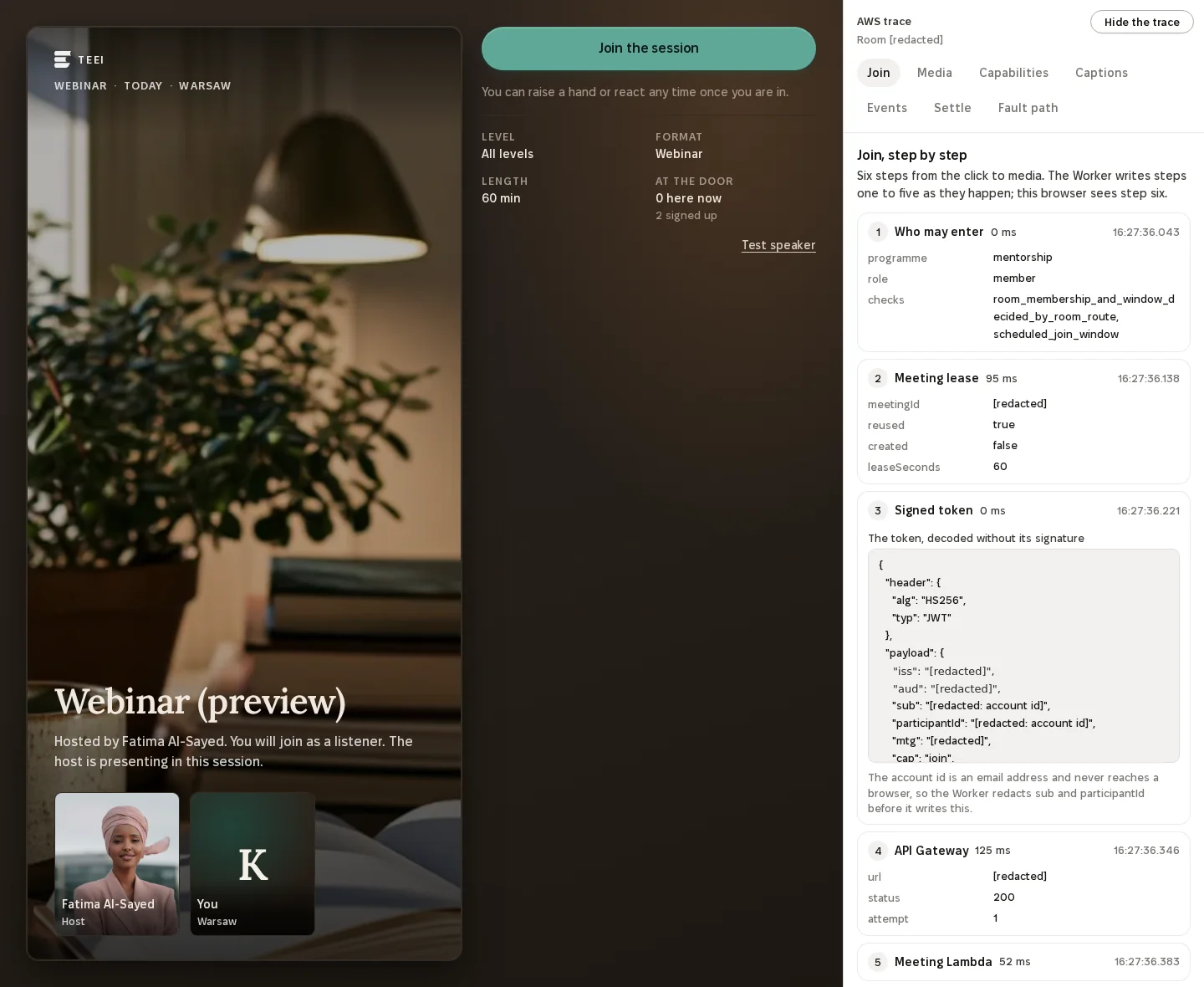
You are in the room as a listener, with the AWS trace open beside it.
Enter the webinar as a listener as the host
Open the host in one tab and a listener in another to see both sides.
The six steps of a join measured 15 October 2026
- 1Who may enter0 ms
- 2Meeting lease95 ms
- 3Signed token0 ms
- 4API Gateway125 ms
- 5Meeting Lambda52 ms
- 6Mediayour browser, straight to Amazon Chime SDK
- 1The room. The host is Fatima Al-Sayed, a demo persona; you join muted, as a listener.
- 2One press joins. Step one, who may enter, is decided before anything reaches AWS.
- 3The AWS trace: Join, Media, Capabilities, Captions, Events, Settle and Fault path.
- 4The join token, decoded. The Worker removes the account id before it writes the trace.
Twelve rooms, one press each
All 25 rows, with the code behind eacheveryone speaksthe host presentslisteners are invited up
TEEI Language
Booked one-to-one
Everyone speaks
TEEI Language
Speaking Café
Everyone speaks
TEEI Language
Workshop
The host presents held by the room
TEEI Language
Peer practice
Everyone speaks
TEEI Language
Guest in a call
Everyone speaks
TEEI Mentorship
Booked mentoring
Everyone speaks
TEEI Mentorship
Group mentoring
Everyone speaks
Skills Academy
Webinar
Invited up to speak Chime enforces
Skills Academy
Class
Everyone speaks
Skills Academy
Expert Q&A
Invited up to speak Chime enforces
TEEI Meetings
Meeting
Everyone speaks
TEEI Meetings
Webinar
Invited up to speak Chime enforces
Each button opens the room in a new tab, in that role. A running room is reused; if its demo personas are all in other rooms, you land on the overview and press again a few minutes later.
Once you are in, a panel beside the room shows what happened on AWS. Its tabs follow the path this article has taken: the join, the settings in the browser, the webinar roles, captions, the event lane with its dead-letter queue and replay, and settlement. A group room or a meeting lets you in as it opens; a one-to-one call waits for you to press Join:
- Join: each step of the join with its timing, the AWS X-Ray trace id, and which function answered.
- Media: packet loss, round-trip time, the video layer being received, the audio profile, and whether Voice Focus is on.
- Capabilities: in a Skills Academy webinar, the
UpdateAttendeeCapabilitiescall made when the host invites a listener to speak, as sent and as answered. Attendee capabilities are what a tile marked Chime enforces stands for. - Captions: Amazon Transcribe captions in a one-to-one session, with a count of the caption bytes that passed through our servers. The count stays at zero, because the captions reach the browser from Amazon Chime SDK.
- Events: every Amazon EventBridge event for the meeting, the fields the forwarding function sends, what our backend did with it, and its receipt in Amazon S3 once the second rule has written it.
- Settle: the attendance settlement, run for this one room at once instead of after the usual wait, with its outcome and the time both people were connected.
- Fault path: in the test environment only, our backend can be set to refuse the next event. A reader then watches that event refused three times, land in the dead-letter queue, and come back stored when the queue is drained.
Inside the trace
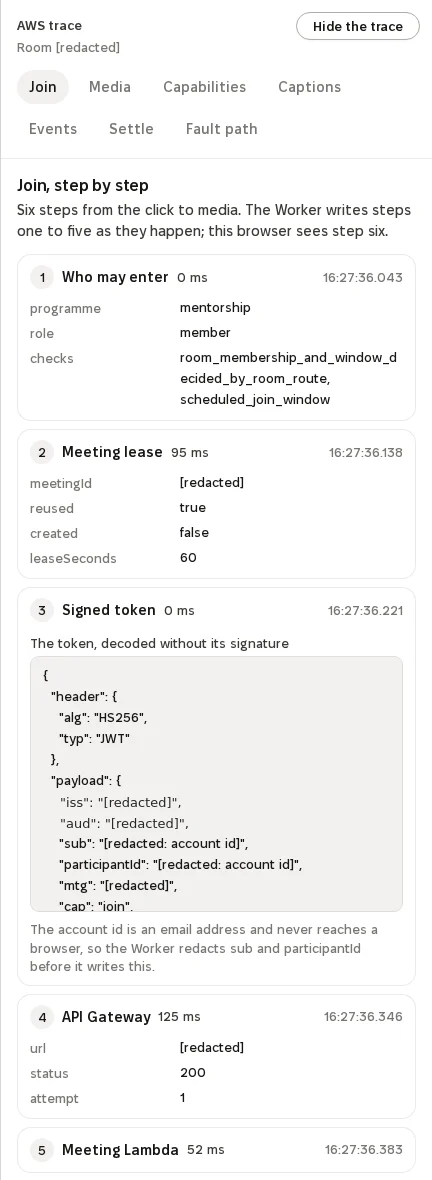
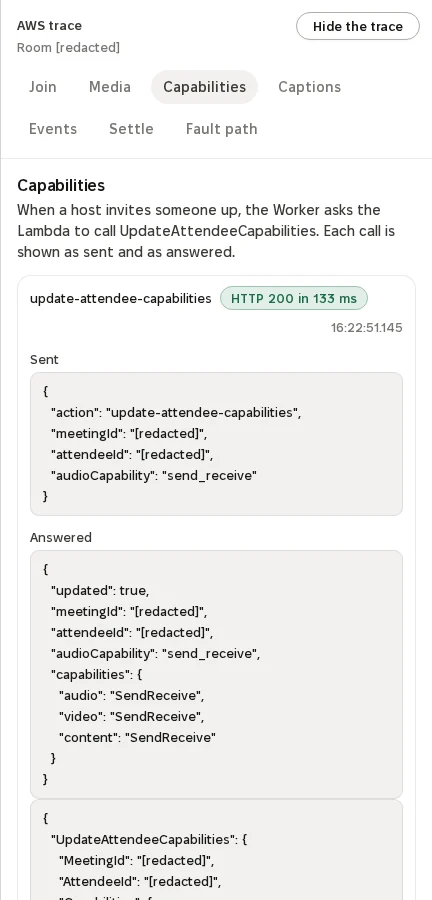
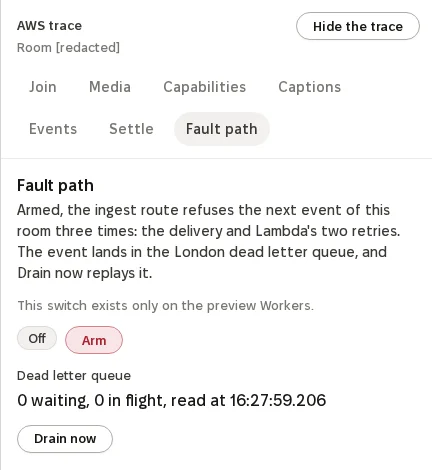
Source: TEEI, captured in the London test environment on 15 October 2026, with demo personas only. Identifiers are removed from the images.
On 15 October 2026 a scripted walk with two browsers joined a Skills Academy webinar in the test room as host and listener, and passed all 23 of its steps. The listener raised a hand, the host invited them to speak, and the capability call answered with HTTP 200 in 115 ms. The meeting’s events arrived with their receipts in Amazon S3. An earlier walk the same day ran the fault path end to end: three refusals, the event in the dead-letter queue, and the event stored after the drain.
What this means for TEEI’s work
TEEI’s work reaches 187+ countries, and our participants and volunteers are spread across languages and time zones, on very different devices and connections. Building on one SDK lets us meet that with one set of decisions instead of one per programme. When we improve speech on a weak network, every Speaking Club, mentoring session and class benefits at once. When a format needs firmer roles, attendee capabilities control who speaks without a media server of our own. When a company asks what its employees contributed, the answer starts from meeting events rather than from a calendar.
Amazon Chime SDK is the layer every programme shares. It carries the live conversations in TEEI Language, Skills Academy, TEEI Mentorship and TEEI Meetings, and it produces the events that programme histories and Evenhall reports are built on. Everything around it, from matching to class certificates, is ours to shape.
Frequently asked questions
How are volunteer hours verified?
From meeting events: the time both people were connected, settled after the session, with at least five minutes together.
What is Skills Academy?
TEEI's learning environment for professional skills, where volunteers teach live workshops, clinics, expert Q&A sessions, webinars and classes.
Does audio or video pass through TEEI's servers?
No. Browsers connect directly to the Amazon Chime SDK media service.
Which AWS Regions do the rooms use?
Meeting media is hosted in Europe (Ireland). Meetings are created, and their events delivered, in Europe (Frankfurt). Both Regions are in the EU.