In July 2026, Grow with Google approved TEEI to distribute 500 Google Career Certificate places on Coursera, free to the people who take them. By 3 November, 454 people had joined and 93 learners had completed a combined 414 courses. Around the courses, TEEI runs study rooms, live teaching, conversation practice and mentoring.
We offer the Google certificates to people from Ukraine, wherever they live, and to women from Latin America and Afghanistan. Anyone who already takes part in a TEEI programme can also ask for a place from inside their TEEI account. Google sets the curriculum, the course records stay on Coursera, and Google issues the certificate when a learner finishes the whole sequence.
A learner asks under Learning Resources. It takes one click and no form, and Coursera emails the invitation without a member of staff approving it first. The whole flow runs on Coursera’s API, built into TEEI Language, TEEI Mentorship and TEEI’s website. The same request gives the learner a seat in the Google Career Certificates room.
Everyone who has asked for a Google place shares one room, listed in Messages. Members ask about a course in the chat, look for someone free to study now, or set a time. A study session takes place in TEEI’s own video room. The DataCamp room and the Google Career Certificates room run on the same room system.
A professional, a conversation partner and a mentor
Volunteers who work in the field teach live in five formats. In TEEI Language, a learner books a one-to-one video conversation with a volunteer and brings the topic. TEEI Mentorship pairs a learner with a volunteer who works in the field they are aiming for. A learner combines these in their own order.
By 3 November, 454 people had joined, 287 were enrolled in at least one course, 93 had at least one completed course, and together they had completed 414 courses. Coursera’s report for October recorded 452 of the 500 places in use, 209 active learners and average learning hours of 6.0. In that month learners took 2,682 assessments.
In July 2026, Grow with Google approved TEEI to distribute Google Career Certificate Scholarships: 500 places on Coursera, free to the people who take them. By 3 November, 454 people had joined Google’s certificate programmes through TEEI, and 93 learners had completed a combined 414 individual courses.
The certificates are part of the self-paced learning in TEEI Skills Academy, alongside DataCamp. Everyone with a place shares a study room, where they talk, plan sessions together and look for someone who is free to study now. From the same TEEI account they can reach live teaching with professionals in Skills Academy, conversation practice in TEEI Language and career mentoring in TEEI Mentorship.
Google develops the certificate programmes and sets the curriculum. Coursera hosts the courses, the assessments and the credentials, and sends the invitations. We distribute the scholarships and run the study rooms, live teaching, language practice and mentoring around the courses.
We offer the Google certificates to people from Ukraine, wherever they live, and to women from Latin America and Afghanistan. Each group has its own page on TEEI’s website. On the page for women, six of the ten certificates are taught in Spanish, and every course of the other four has Spanish subtitles.
Anyone who already takes part in a TEEI programme can also ask for a place from inside their TEEI account.
The programmes open through TEEI cover data analytics, project management, UX design, cybersecurity, digital marketing and e-commerce, IT support and AI. There are more advanced programmes in data analytics, business intelligence and IT automation with Python, and shorter specialisations such as Google AI Essentials and Google Prompting Essentials. A learner chooses the one that fits their work, their studies or a move into a different field.
Source: The TEEI platform, Learning Resources, shown with example data, 3 November 2026, at 1440 px and 390 px.
A Professional Certificate is a sequence of courses. In Google Data Analytics, learners begin with analytical thinking and the questions data can answer. They move on to preparing data, working with databases, cleaning data and checking the results, and finish by presenting what they found. TEEI’s catalogue shows each course and its modules, so a learner can look at the actual work before choosing a programme.
Source: TEEI’s website, the Google Career Certificates page under Students, Women (students/women/certificates), captured 3 November 2026 at 390 px.
We built these pages from Coursera’s public catalogue and its course pages. They show Coursera’s own content: level, pace, teaching language, the courses, the hours for each and the modules inside them. Only the ten programmes Coursera classes as Professional Certificates carry that name, and the nine shorter specialisations are listed as what they are. Each certificate’s English edition links to its Spanish or Portuguese edition where one exists.
The study itself happens on Coursera. Learners work through the material, complete exercises and assessments, and come back to the programme at their own pace. Google sets the curriculum, the course records stay on Coursera, and Google issues the certificate when a learner finishes the whole sequence.
A learner asks for a place under Learning Resources in their TEEI account, in TEEI Language or TEEI Mentorship. It takes one click and no form, because their name and email address come from their sign-in. We send the request to Coursera straight away, without a member of staff approving it first, and Coursera emails the invitation. The learner does not need a Coursera account beforehand.
The whole flow runs on Coursera’s API, built into TEEI Language, TEEI Mentorship and TEEI’s website. When a learner asks for a place, the platform sends the invitation through the API and reads the programme’s member list to see who has accepted. TEEI’s website collects the enrolment report every day. TEEI follows each place from the request to acceptance, and the daily reading counts the learners who enrol and the courses they complete.
Source: TEEI, drawn 3 November 2026 from the platform’s Coursera access flow.
Each invitation is tied to the request rather than to an account. It carries four things: the learner’s name and email address, the request’s id and the programme’s id. The reference we give Coursera is that request id, never an address or an account number. Someone who has a TEEI account in both programmes receives one place, not two. If Coursera already has an invitation for that address, we recognise it instead of sending another. If the person is already in the programme, we record their access at once. A request the automatic process cannot complete stays visible to the TEEI team, who resolve it by hand.
The learner accepts the invitation on Coursera and signs in with the address it was sent to. While invitations are outstanding, TEEI reads the programme’s member list through the API every 15 minutes and marks a place as accepted when the person appears in it. Coursera’s list is the record we go by, so someone the team adds directly in Coursera is picked up the same way. If the list cannot be read, that round changes nothing. A learner who has not accepted a day after asking gets one reminder, which explains that the address has to match. From the card in TEEI, they can open the Google programme on Coursera directly.
Source: The TEEI platform, Learning Resources, shown with example data, 5 November 2026, at 1440 px and 390 px.
People without a TEEI account ask through the form on the certificate pages. It writes to the same records as the platform, so TEEI has one count of the places. Coursera counts a licence when an invitation is accepted. Because each invitation can become a place, the form limits repeat submissions and holds a suspicious one for the team instead of sending an invitation.
When the count reaches the limit, a new request joins a waiting list. The TEEI team can withdraw an invitation that has gone unanswered for a week and offer the place to the people waiting, oldest first. We read Coursera’s member list before and after, so someone who accepted in the meantime keeps their place.
The same request gives the learner a seat in the Google Career Certificates room. There is nothing else to apply for.
A self-paced course is usually studied alone. We built the study rooms in Skills Academy so that learners have other people around the course. Each learning resource has its own room: learners with DataCamp share the DataCamp room, and everyone who has asked for a Google place shares the Google Career Certificates room. The room is listed in Messages, and it is the same room whether a learner arrives from TEEI Language or TEEI Mentorship.
Source: The TEEI platform, the Google Career Certificates room, shown with example data, 5 November 2026, at 1280 px and 390 px.
Chat is where members ask about a course, recommend something that helped them or talk through what they are working on. Someone starting a certificate can ask people further along about the order of the courses. A learner stuck on a difficult topic can describe the problem, and others answer from their own experience.
Beside the chat is the Study area. On a wide screen the two sit side by side. On a phone, learners switch between the Chat and Study tabs, and the conversation stays where it was while they arrange a session. The room continues between video sessions. Members can return to the same discussion, arrange another meeting and keep studying with people they have already met. Questions about an invitation, signing in or personal details go to the TEEI Team in a private conversation, also in Messages.
Study now is for the moment a learner has time and would rather not study alone. They choose how long they have, 30, 45, 60 or 90 minutes, and whether they want one person, a small group of three to six, or either. While they wait, the room shows how many others are looking for the same length right now, as a number and never with names. They can keep chatting in the meantime.
Source: The TEEI platform, the Google Career Certificates room, Study now, shown with example data, 3 November 2026, at 1440 px and 390 px.
Study now runs on the same matching engine as real-time practice in TEEI Language. Each room has its own pool, and a learner waits in one room at a time. Anyone who already has a TEEI session booked at that moment is left out of the round. When enough people are free for the same length, we create a study session in the room that starts at once, with a place for each of them. Each gets a notification with the way back into the room. If nobody is free, the learner can plan a session for later instead.
The match is on time, not on course or level. One learner can be in a Data Analytics module while another works through Project Management. They can talk through what they are doing, or work on their own material side by side and keep each other going. The course stays on Coursera. The room provides the people and the meeting around it.
It shows the TEEI DataCamp Room, which is built on the same room system as the Google Career Certificates room; the names in it are fictional.Source: TEEI, the Study Room film as posted on LinkedIn, 29 October 2026.
A study session takes place in TEEI’s own video room, built on Amazon Chime SDK, the same video room TEEI uses for language conversations and live teaching. Underneath, a study session is an ordinary TEEI group session, so it comes with the same reminders and attendance record as the others.
For learners who prefer to plan, the Study area has two ways to arrange a session. Set a time lets a member pick a day and an hour and create the session there and then. It appears under Coming up with its creator already holding a place, and anyone in the room can join from the session card.
Source: The TEEI platform, the Google Career Certificates room, Set a time, shown with example data, 3 November 2026, at 1440 px and 390 px.
Find a time starts with a question to the room. The member who asks chooses the length, the days and hours to ask about, and how many people must be able to come, from two to twelve. Members mark the hours they are free. As soon as one hour reaches that number, the session is set up for everyone who marked it. The question sits under Coming up and in the chat, so the conversation and the planning stay together.
Source: The TEEI platform, the Google Career Certificates room, Find a time, shown with example data, 3 November 2026, at 1440 px and 390 px.
Every time is shown in the reader’s own time zone, so a learner in Kyiv and one in Bogotá see the same session at their own local hour. Any member can set up a study session. The room’s hosts also run two kinds of meeting in it. Certificate Coffee is for conversation. Certificate Exchange is for discussion or short presentations, with resources to share if the host adds them. A host can set the time, or let the room choose.
The DataCamp room and the Google Career Certificates room run on the same TEEI room system. They share the chat, the planning, Study now and the video room. Each has its own members, its own conversation and its own matching pool.
Source: The TEEI platform, the Study tab of the TEEI DataCamp Room and of the Google Career Certificates room, shown with example data, 3 November 2026, at 390 px.
We built it that way so that every new learning resource in Skills Academy gets its room on a system that already works: chat, planning, matching and video from the first day, with its own members and purpose. A learner who studies on both DataCamp and Coursera has a seat in both rooms.
Studying with another learner and learning from someone who does the work are different kinds of help, and Skills Academy has both. A learner on Google Data Analytics can bring their work to a clinic and discuss how they checked their data, or why they chose to present a result one way.
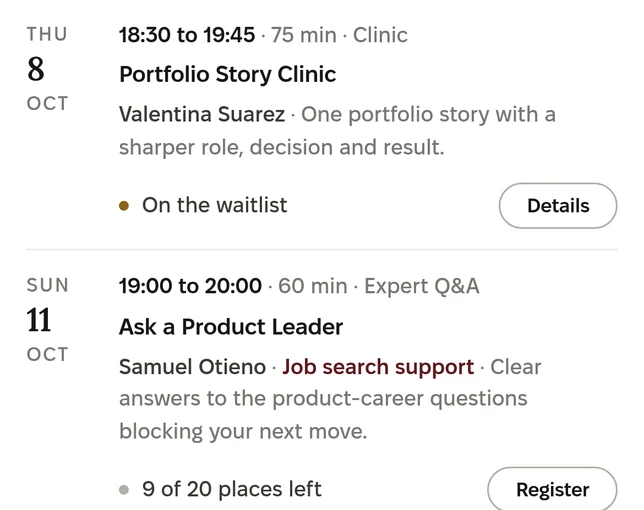
Volunteers who work in the field teach live in five formats. A workshop is guided practice around one task. A clinic is time to bring your own work or question to someone who uses the skill professionally. An expert Q&A gives a group time to ask about a field, and a webinar shows how a professional uses a skill. A class meets weekly for two to six weeks, with work in between.
Before booking, a learner can see who teaches the session, what it covers, what to prepare and what they should leave with. Discover lists the sessions by topic, date, format and language, and My Academy keeps a learner’s bookings, class meetings and tasks together.
Source: The Skills Academy tour, Discover, shown with example data, 1 November 2026, at 1440 px and 390 px.
In a class, learners submit work, assess it against the class criteria and receive feedback. First feedback from AI is labelled as such, refers to the learner’s own work, and is separate from the class team’s assessment. A person on the class team reviews the work, and a completed class earns a Skills Academy class certificate. The Google certificate remains Google’s qualification, earned on Coursera.
Source: First feedback on a class task, shown with example data, 1 November 2026, at 390 px.
Understanding a subject is not the same as discussing it at work in another language. In TEEI Language, a learner books a one-to-one video conversation with a volunteer and brings the topic. For someone on Data Analytics, that might be explaining an analysis, describing a chart or answering questions about a project. For someone preparing for a new role, it might be interview practice. Group conversations are open too.
Source: TEEI’s video room, shown with example people, 18 October 2026, at 1440 px and 390 px; first published in TEEI’s article on Amazon Chime SDK.
TEEI Mentorship pairs a learner with a volunteer who works in the field they are aiming for. Together they talk about which skills to build, how the profession works, how to present earlier experience and what to do next. A learner can meet a mentor before choosing a certificate, while working through it or after finishing it.
Source: The public TEEI Mentorship demo, shown with example data, captured 3 November 2026 at 1440 px and 390 px.
A learner combines these in their own order: a Google certificate on its own, a study partner alongside it, or a clinic, a conversation partner or a mentor when a question calls for one.
Once a day, we read the programme’s memberships and enrolment report through Coursera’s API. From this reading we keep four totals and the date it was done, and nothing per person: people who joined, learners enrolled in a course, learners with a completed course, and completed courses. Coursera records the course learning. TEEI records attendance at its own sessions separately.
Table 1The Google programme at TEEI, as TEEI read Coursera’s data on 3 November 2026.
Measure
Count
People who had joined the Google programmeAccepted a TEEI place on Coursera
454
Learners enrolled in at least one course
287
Learners with at least one completed course
93
Completed coursesIndividual courses within the certificate programmes
414
Of the 454 people who had joined by 3 November, 329 joined during September and 109 in October. A certificate such as Google Data Analytics is designed to take about six months at ten hours a week.
Source: Coursera programme membership data as read by TEEI, 3 November 2026.
Coursera’s report for October, sent on 3 November 2026, recorded 452 of the 500 places in use, 209 active learners and average learning hours of 6.0. In that month learners completed 13,076 items inside the courses and took 2,682 assessments. The courses with the most active learners were Foundations: Data, Data, Everywhere, with 75, Ask Questions to Make Data-Driven Decisions, with 34, and AI Fundamentals, with 27. The first two open Google Data Analytics.
In four months, the scholarships from Grow with Google have given 454 people a place on Google’s certificate programmes, free. Ninety-three of them have already completed a combined 414 courses, and in October alone learners took 2,682 assessments. Coursera hosts the learning, and its API runs the invitations and the reporting in TEEI’s systems. Around the courses, learners have a room of people on the same path and a way to look for others who are free to study. Live teaching, conversation practice and mentors are there when they want them.
To the teams behind Grow with Google and the Google programmes on Coursera: thank you for the places, and for the courses our learners are working through. And thank you to the learners who took them.
While places remain, people can ask for one through the certificate pages on TEEI’s website, and anyone in a TEEI programme can ask under Learning Resources in their TEEI account. The Google Career Certificates room is in Messages.
Meet people.Practise a language. Build a skill.Work through a career question.
Start with what matters to you, and combine the support you need.
Contact & belonging
Make time for a conversation.
Talk about everyday life. Meeting people can be the reason to take part.
Social connection is a reason of its own.
These are different offers. Each programme explains who can take part.
TEEI LanguageGroup conversationSample
Conversation · 00:344
HostIngridVolunteer · speaking
Olena21:04 · Kyiv
TomasVolunteer
HalynaKharkiv
A conversation with others.
Join a Speaking Café or another group session. Meet people while using the language together.
Women Buddy Programme
A peer connection.
A distinct programme for women, built around human contact.
Different ways to connect
Illustrated examples
Groups
Practise right now, or meet the same people every week.
Four ways to practise and meet with others, in TEEI Language and TEEI Mentorship. Every group keeps its own chat.
Practise now
You are in the practice queue
Small groupEnglish30 min
Looking for learners for a small group
Other learners waiting in English: 4
Leave the queue
TEEI Language
Practise now
Press once. TEEI finds another learner, a small group or a free volunteer, and prepares the room.
This week · a table is forming
English · 45 minutes
3
2 of 3 seats taken
Take the third seat
TEEI Language
A table for three
Learners at a similar level pick the same time. The third seat confirms the table, and the three can keep it every week.
Groups
Speaking CaféEnglish · B1
Discussion GroupEnglish · B2MS
Study GroupNorwegian · A2EK
WorkshopSocial Club
TEEI Language
Speaking Clubs
Volunteers set up and lead groups in five formats: Speaking Café, Discussion Group, Workshop, Social Club and Study Group.
Group mentoring
Preparing for interviews
Mentor
AMLSDKRH
One mentor · six mentees
TEEI Mentorship
Group mentoring
A mentor and a small group around one topic, from two to twelve mentees.
In every group
A chat for the group
It opens when you get a seat. Photos, voice messages and pinned notes, and any message can be reported to the TEEI team.
Group chatSpeaking Café · Thursday
Pinned: Thursday 18:00, food from home
Ingrid Host
Welcome, everyone. On Thursday we talk about food from home.
Olena
I will bring my grandmother’s recipe for varenyky.
F
Fatima
0:14
Write a message to the group
Illustrated examples · sample data
The reason to meet
Connection matters.
Group sessions and Women Buddy are different ways of meeting people.
Employees contribute through programmes. Evenhall reports associated employee activity.
Free to take part. Each programme explains who it is for.
A complete learning experience
Use language in real life.
A teacher, independent practice and conversations with other people. Three complementary ways to learn a language.
Choose the combination that helps you. There is no required order.
TEEI Language Courses Sample
TEACHER-LED CLASSTalking about your day.
Learn with a teacher.
Structured classes give your learning shape.
Bring it into conversation
Practice Companion
Product screen with sample data
Practise independently.
Guided AI practice between conversations.
Keep practising between meetings
TEEI LanguageOne to oneSample
Conversation · 00:2320:39
IngridVolunteer
Olena21:04 · Kyiv
Talk about your working day.
Have a conversation with a volunteer, one to one or in a small group.
Use the language with people
Product screen and illustrated examples · sample data
Credentials
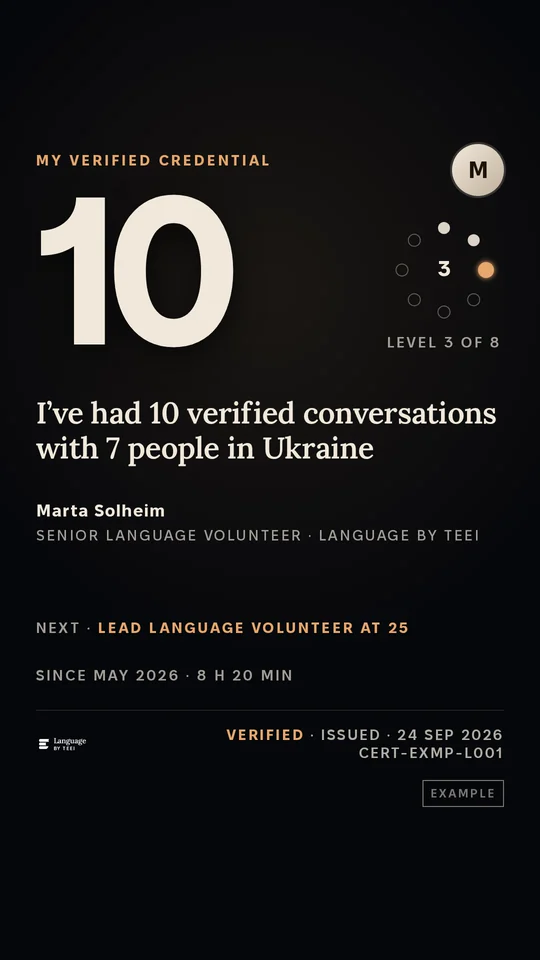
Every completed conversation counts toward a Language credential.
Olena · 12
2
5
10
25
50
100
200
500
Level 3 of 8Dedicated Language Learner · 12 verified conversations
Each level gives a badge and a LinkedIn entry under Licenses & certifications, with TEEI as the issuer. A printable hours statement and a public page anyone can check by its code come with it.
Story cards and story videos
A conversation, ready to share.
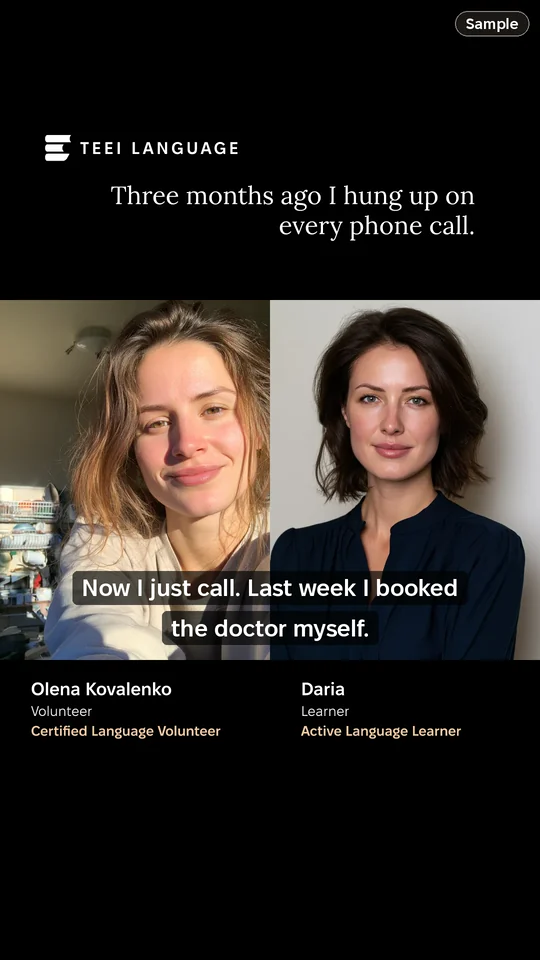
After a conversation, a card is ready in the app: a line on the map from your city to your partner’s, how many conversations you’ve had, or a sentence in your own words. You can also record a story video in the app, on your own or together during a session in TEEI’s video room.
Yours to share. You share from your own phone, as a Story or a post. TEEI never posts for you.
Everyone agrees first. A video is shared only when everyone in it has approved that version.
Made from real conversations. Every card comes from a verified conversation.
Sample
9:41
Mmarta2h
Send message
Instagram Story
9:41
FollowingFor You
+12812931
@daria
Now I just call. Last week I booked the doctor myself.
Original sound · daria
HomeFriendsInboxProfile
TikTok, in the For You feed: the same story video posted by daria, with the caption Now I just call. Last week I booked the doctor myself. Sample data.
9:41
DariaPharmacist · Kyiv2h ·
Three months ago I hung up on every phone call. Now I just call. Last week I booked the doctor myself.
1:48
243 comments
LikeCommentRepostSend
HomeMy NetworkPostNotificationsJobs
LinkedIn post by Daria, pharmacist in Kyiv: Three months ago I hung up on every phone call. Now I just call. Last week I booked the doctor myself. With the story video, 1:48, Olena Kovalenko and Daria side by side. Sample data.
Instagram Story, as a follower sees it
People make this possible
A one-to-one conversation partner.
Employees can contribute their time through TEEI programmes.
From the session record
Time spent together.
Shared attendance is settled before the contribution reaches company reporting.
Company records cover the contributions of associated employees.
Volunteer Community↔Volunteers share their experience in a community of their own.Free to take part. Each programme explains who it is for.
Self-paced resources
Learn at your own pace.
Courses, learning resources and certificates.
Ideas to work with ↔
Self-paced resources and live learning can be combined in the way that helps you.
Skills AcademyMy AcademySample
Learn at your own pace.
Courses, learning resources and certificates.
Ideas to work with
Skills Academy Sample
Live learning
Learn with a practitioner.
Workshop · Clinic · Expert Q&A · Webinar · Class
Bring your questions
Put it into practice Sample
Make something. Explain your thinking.
Use a task or a small project to work with what you have learned.
Put it into practice
Product screens and illustrated example · sample data
Credentials
A class ends in a certificate issued by TEEI.
Mon 28 SepMeeting 1
Mon 5 OctMeeting 2
Mon 12 OctMeeting 3
Mon 19 OctMeeting 4
Tue 20 OctConfirmed
A class runs two to six sessions with the same group. When the teaching team confirms the completion, TEEI issues the certificate, with a badge and a LinkedIn entry under Licenses & certifications.
People make this possible
Someone shares a skill. The contribution is recorded.
A practitioner teaches through Skills Academy. The associated company can see that contribution in Evenhall.
Volunteer Community↔Volunteers share their experience in a community of their own.Free to take part. Each programme explains who it is for.
One possible career question
How do I explain my experience?
Your CV. An interview. A change of direction.
Work it through together
Choose the support relevant to you. There is no fixed sequence or promised job outcome.
TEEI Mentorship Sample
Mentoring · 00:4118:12
TomasMentor · speaking
Professional perspective.
Meet a mentor with relevant experience and decide what to work on.
Language + Skills
Practise. Learn. Apply.
Use language practice or Skills Academy where it helps your goal.
TEEI LanguageSkills Academy
Add the support you need
Illustrated demo
Credentials
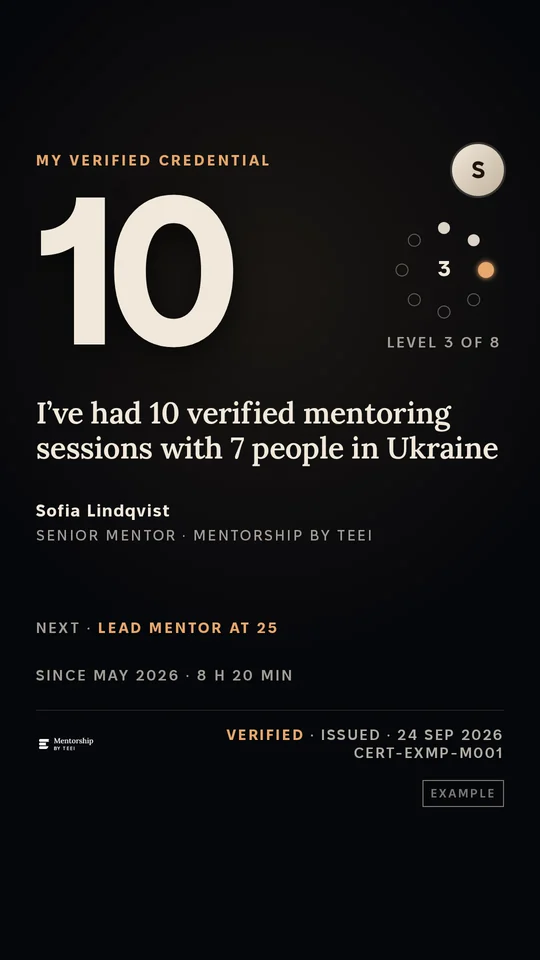
Every mentoring session counts toward a Mentorship credential.
Olena · 6
2
5
10
25
50
75
100
150
Level 2 of 8Career Fellow · 6 verified mentoring sessions
Each level gives a badge and a LinkedIn entry under Licenses & certifications, with TEEI as the issuer, and a public page anyone can check by its code.
Story cards and story videos
A mentoring conversation, ready to share.
A story video is recorded in the app on your own, or together with your mentor or mentee during a session in TEEI's video room. The TEEI mark, the sentence you chose, and each person's name and role are set into the file itself.
Yours to share. You share from your own phone, as a Story or a post. TEEI never posts for you.
Everyone agrees first. A video is shared only when everyone in it has approved that version.
Sample
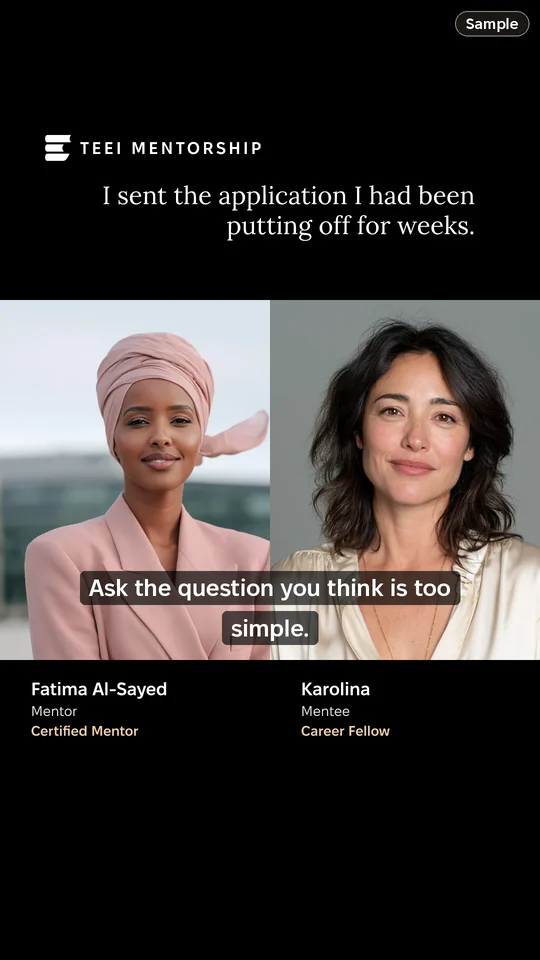
9:41
KarolinaProduct designer · Kyiv2h ·
I sent the application I had been putting off for weeks. Ask the question you think is too simple.
1:48
243 comments
LikeCommentRepostSend
HomeMy NetworkPostNotificationsJobs
LinkedIn post by Karolina, product designer in Kyiv: I sent the application I had been putting off for weeks. Ask the question you think is too simple. With the story video, 1:48, Fatima Al-Sayed and Karolina side by side. Sample data.
9:41
Ssofia2h
Send message
Instagram Story
9:41
FollowingFor You
+12812931
@karolina
I sent the application I had been putting off for weeks.
Original sound · karolina
HomeFriendsInboxProfile
TikTok, in the For You feed: the same story video posted by karolina, with the caption I sent the application I had been putting off for weeks. Sample data.
LinkedIn post, dark mode
People make this possible
A professional volunteering as a mentor.
Employees can contribute their time through TEEI programmes.
From the session record
Time spent together.
Shared attendance is settled from the session record, separately from any career outcome.

 HostIngridVolunteer · speaking
 Olena21:04 · Kyiv
 TomasVolunteer
 HalynaKharkiv


 TEACHER-LED CLASSTalking about your day.

 IngridVolunteer
 Olena21:04 · Kyiv

 Live learning
 TomasMentor · speaking



 +

