
Engineering noteResearch & Engineering
How Evenhall Drafts Company Reports with the Vercel AI SDK
Streaming, tool-grounding and human approval: one sample company report, from volunteer hours to a shared link, drafted with the Vercel AI SDK.
The programme
On this page
- Key facts
- One report in five stages
- Stage 1: the hours
- Stage 2: the data block
- Stage 3: the AI draft
- The notes on the page
- Streaming the report, not the model’s working notes
- Why blocks and not tokens
- How we test it
- The wire to the browser
- After the stream
- Stage 4: review and approval
- Stage 5: the finished report, and sharing it
- Running it on Cloudflare Workers
- What we measured, and what we have not
- Verify this
- Frequently asked questions
Streaming, tool calls that look up how each cited figure is counted, and a manager who approves. One sample company’s quarterly report, followed from the volunteer hours to a shared link, and measured in a local copy of Evenhall on 17 October 2026.
TEEI’s free programmes connect people from Ukraine, and women from Latin America and the Caribbean, with volunteers who help them practise a language and build a career. The Educational Equality Institute runs those programmes on its own platform: TEEI Language, then Skills Academy, then TEEI Mentorship, with Evenhall by TEEI as the workspace for partner companies. Evenhall is where a partner company’s managers invite employees into TEEI’s programmes, see what they did there, and turn it into a report they can file. Companies pay nothing for Evenhall.
This article follows one manager through one report: a quarterly impact report for Horizon Technologies, a company we invented for the purpose. The hours its colleagues gave become a block of data. A model drafts the report from that data and looks up how the figures it cites are counted. The manager reads the draft, approves it and shares it. The model’s part runs through the Vercel AI SDK, an open-source TypeScript toolkit from Vercel, released under the Apache 2.0 licence with its source on GitHub. At each stage we show what the SDK does, what our own code does around it, and what the manager decides. The SDK runs inside Evenhall’s Worker on Cloudflare; Vercel hosts nothing of ours.
This is one integration, in Evenhall. It is not the basis of every AI feature at TEEI: the AI checks in our programmes, described in What TEEI Runs on AWS, call Amazon Bedrock from AWS Lambda through the AWS SDK. We wrote this for developers who build multi-step tool calls with the AI SDK, for the people who build the SDK, and for the managers who file the report. For SDK developers, the core is stage 3: why we read result.stream through a filter of our own instead of forwarding textStream. The code is the version Evenhall ran in production on 17 October 2026, on AI SDK 7.0.92.
Built through volunteer contributions. TEEI’s software platforms are built through volunteer work, with NOK 0 spent on paid software development. Infrastructure and third-party services are separate from that figure.
The screens of Horizon Technologies and the timings and counts of the sample run come from runs on 17 October 2026, in a copy of that version of Evenhall on one machine. The copy ran on local databases with one synthetic company, Horizon Technologies (sample), and every screenshot of it carries our label Synthetic sample data; its 15 volunteers, their sessions and its figures are invented. The model calls were real: Claude Sonnet 4.6 on Amazon Bedrock, through an EU cross-Region inference profile, the model Evenhall uses for this report type. We changed one thing in the copy, a tap that writes down every part of the SDK’s stream with its time, which Evenhall does not record. Times are seconds after the manager clicked Generate, on one clock. They describe this run on this machine, not production latency. We made two runs. The second is the one we show; the first is in the measurements near the end.
Key facts
- A report draft in Evenhall is one call to
streamTextfrom AI SDK 7.0.92, inside a Cloudflare Worker, with two tools that look up how a figure is counted and the record behind it. - The SDK runs the loop: it calls Claude on Amazon Bedrock, checks each tool input against a zod schema, runs the tool and calls the model again. In the sample run that took four steps and 19 tool calls, and 29,523 input and 6,380 output tokens by the SDK’s own count.
- Everything around that call is Evenhall code: the block of data the model writes from, the filter that decides which text is report and which is the model’s notes, the stream to the browser, the checks and records after the run, the approval and the sharing.
- In the sample run the first block of the report reached the browser after 11.2 seconds and the last after 66.9. Recording the draft and its 63 cited figures took another 12.3 seconds.
- The prompt tells the model to write no notes about its process. It wrote one in every step, in both runs: seven notes in seven steps. The filter let none of them through.
- A manager approves every report. Approval locks it, a draft with an unknown citation cannot be approved, and only an approved report can be shared through a public link.
- You can reproduce the filter with the SDK’s mock model, without a key or a network.
One report in five stages
The report passes through five stages, and the AI SDK works in one of them. The stages before it decide what the model sees. The stages after it decide what becomes the company’s report.

Stage 1: the hours
A report is only as good as the records under it, and those records start in the programmes. A colleague at a partner company volunteers in TEEI Language, Skills Academy or TEEI Mentorship. Sessions become records with a person, a programme, the hours and a status. Live sessions in all three programmes run in our own video rooms, and a verified hour is measured from the room: how a meeting becomes hours is in From Practice Room to Company Report, and what we count as a verified hour, and what we do not, is in How TEEI Counts a Verified Volunteer Hour. Hours a volunteer reports themselves are kept apart from verified hours all the way into the report.
A manager sees the programmes from Evenhall, where they invite colleagues and share a link to join.

From there, completed sessions land in the company’s record. This is how that looks on a phone in Evenhall’s public demo:

For the sample run, we gave Horizon Technologies one quarter of activity: 15 volunteers, 607 completed sessions and 822.25 hours between 1 July and 30 September 2026, in all three programmes. Of those hours, 339.75 were verified and 482.5 were self-reported. The company also has published stories from its volunteers, the kind a report may quote.
Stage 2: the data block
The manager opens Reports, switches to AI narrative and opens the report settings. A report type is a template and a prompt, from a weekly summary to an annual impact report, with types for the European Sustainability Reporting Standards and a custom report beside them. Our manager picks the quarterly impact report and sets the period to the third quarter.
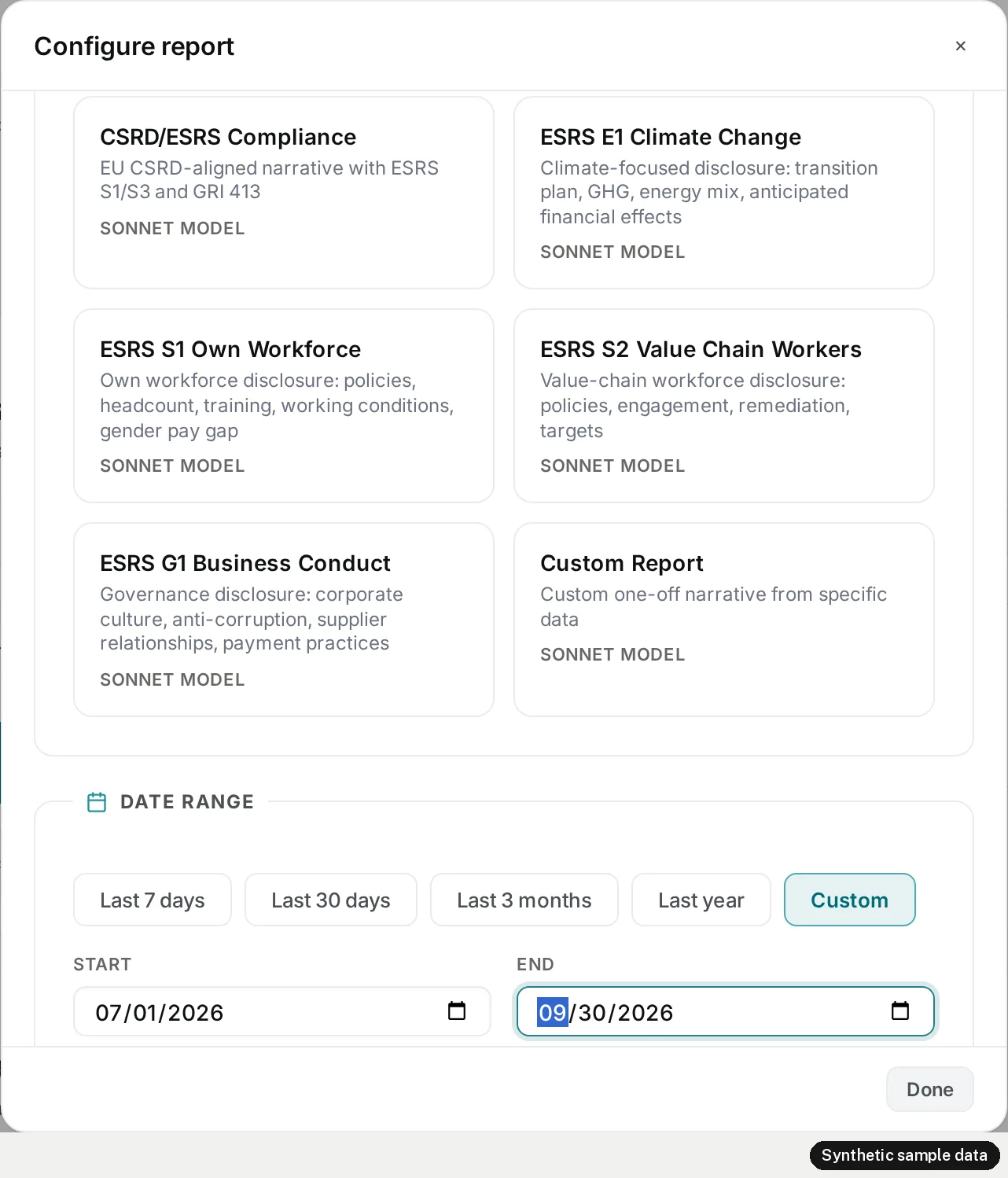
When the manager clicks Generate, Evenhall reads the company’s figures for the period into a block of data. This is the part of the prompt the model writes from. Here it is from the sample run, shortened:
Shortened for publication: the figures, programmes, trends and volunteers are cut short, and the stories are left out.
<data>
<report_window>{"start":"2026-07-01","end":"2026-09-30"}</report_window>
<partnership_timeline>{"workspaceCreatedOn":"2026-10-17","firstActivityOn":"2025-08-20","lastActivityOn":"2026-10-17"}</partnership_timeline>
<stats>{"totalHours":822.25,"totalSessions":607,"uniqueVolunteers":15,"activeProgrammes":3, …,
  "verifiedHours":339.75,"selfReportedHours":482.5, …}</stats>
<programmes>[{"name":"TEEI Mentorship","hours":179.75,"sessions":153,"volunteers":15}, …]</programmes>
<trends>[{"date":"2026-07","hours":274.5,"sessions":204}, …]</trends>
<stories>[ … five published stories … ]</stories>
<top_volunteers>[{"name":"Volunteer 1","hours":59.75,"sessions":40}, …]</top_volunteers>
</data>
Three things about this block matter for the rest of the article. First, it is where the model gets the company’s activity. Second, it is careful with people. In the list of the most active volunteers, a colleague appears by name only if they have chosen to appear in rankings; the others appear under a pseudonym, as all ten do in the sample, and no contact details are sent. Third, the verified and the self-reported hours arrive as separate fields, so the draft can keep them apart.
After the data comes a template. For the quarterly report it has eight sections, each opened by a marker and a heading:
Shortened for publication: five of the eight sections are left out.
<!-- SECTION: executive_summary -->
## Executive Summary
<!-- SECTION: quarter_at_a_glance -->
## Quarter at a Glance
…
<!-- SECTION: appendix -->
## Appendix: Key Figures
Those markers come back later. They are how our filter knows where the report starts.
The system prompt sets the rules for figures. Every number must be grounded by a tool call before it appears in the prose, and cited inline as [ref:slug]. A map names the methodology behind each field of the data block, word for word from the run:
Verbatim excerpt, wrapped to fit; four more lines of the map are left out.
FIGURE_METHODOLOGY:
Each <data> field below is measured by the methodology after the arrow. Before stating a figure
from one of these fields, call lookup_methodology with that slug and cite it. A figure from a
<data> field that is not listed here has no registered methodology: mark it [ungrounded].
- stats.totalHours, programmes[].hours, trends[].hours, top_volunteers[].hours -> [ref:platform-recorded-volunteer-hours-v1]
- stats.verifiedHours -> [ref:platform-verified-volunteer-hours-v1]
- stats.selfReportedHours -> [ref:platform-self-reported-volunteer-hours-v1]
And one line of the prompt will matter in stage 3:
Verbatim, wrapped to fit.
- Output only the finished report, starting with the first section marker or heading. No notes
  about your process or tools ("I'll", "Let me", "Now I have", "Here is the report").
Before any model call, Evenhall checks whether it has written this report already. It hashes the version of the prompt template, the report type, the data and any instruction the manager added. If a stored draft has the same key, the browser gets that draft, and the model is not called. We tried it: asked again for the same report type over the same data as our first run, Evenhall answered in 0.33 seconds with three frames, cached, one text frame holding the whole draft, and done. The cache is Evenhall’s, not the SDK’s.
Nothing in stage 2 is the AI SDK. The data, the template, the prompt and the cache decide what the model sees and whether it is asked at all.
Stage 3: the AI draft
Where the SDK sits
The request goes to Evenhall’s report route, a React Router 8 application on Cloudflare Workers. The route builds the prompt and two tools for this company and calls streamText. From there the SDK talks to Claude on Amazon Bedrock through its Bedrock provider, runs the tools inside the Worker when the model asks for them, and hands the model the results. What comes back passes through our filter, and the route sends the report to the browser as server-sent events. When the run is complete, the route checks and stores the draft.

Put as a list of jobs, stage 3 divides like this:
| Job | Done by |
|---|---|
| Call Claude on Amazon Bedrock and read its streamed answer | AI SDK, Bedrock provider (@ai-sdk/amazon-bedrock 5.0.74) |
| Check each tool input against its zod schema, run the tool, give the model the result | AI SDK (tool(), streamText) |
| Decide whether to call the model again after a tool call | AI SDK, with our stop condition |
| Report every part of every step as a typed stream, then the steps and the token usage | AI SDK (result.stream, result.steps, result.totalUsage) |
| Read the company’s figures, write the prompt and the template | Evenhall |
| Look up a methodology or a ledger row | Evenhall, inside each tool’s execute |
| Tell report text from the model’s notes | Evenhall’s filter |
| Send blocks and heartbeats to the browser, serve the cache | Evenhall’s route |
| Check citations, store the draft, record each cited figure | Evenhall’s route, after the stream |
| Approve, export and share | The manager, in Evenhall |
Two tools
The tools are how a figure gets its source. lookup_methodology returns how a figure is calculated: the formula, the version, a short fingerprint and the reporting standard it maps to, if any. lookup_evidence returns the ledger row behind one figure: its value, its confidence and its methodology. Both are defined with the SDK’s tool() and a zod schema, so the SDK checks the model’s input against the schema before our code runs:
Shortened for publication: the lookup itself is left out.
export function buildMethodologyTools(runtimeEnv: RuntimeEnv, companyId: string) {
  return {
    lookup_methodology: tool({
      description:
        "Look up an active methodology slug to use in a citation. ... Call this BEFORE emitting a numeric claim that is grounded in a registered methodology.",
      inputSchema: z.object({
        slug: z.string().min(1).max(128),
      }),
      execute: async (input) => {
        // Read the methodology registry. A retired or unknown
        // slug returns an error object the model can read, not an exception.
      },
    }),
    // lookup_evidence: the same shape, keyed by entity type, id and field.
  };
}
The tools are built for every request, closed over the company. The model can ask for a slug, but the company is fixed when the tools are built and is not part of their input, and the model never sees the Worker’s environment. An error comes back as an object the model can read, so a wrong slug is an answer, not a failed run.
This is what the first tool call of the sample run returned, word for word:
Verbatim, from the run’s tool log.
{
  "slug": "platform-recorded-volunteer-hours-v1",
  "version": "1.0.0",
  "fingerprint": "b5ec",
  "title": "Recorded volunteer hours (all completed sessions)",
  "formula": "hours = sum(hours) over completed sessions dated in the window",
  "esrsRef": null,
  "methodologyType": "internal",
  "groundsFields": ["stats.totalHours", "programmes[].hours", "trends[].hours", "top_volunteers[].hours"]
}
lookup_evidence is harder for the model to use, because it has to name a ledger row by entity type, id and field. In the sample workspace no ledger row existed under the identifiers it chose, such as the entity stats.totalHours with the field value_current, so each of its twelve evidence lookups returned {"error":"evidence_not_found"}. The model said what it would do about that in its last note, quoted below: cite every figure by its methodology only. The draft it went on to write carried 63 citations, each with a slug and the fingerprint a methodology lookup had returned.
A loop, not a call
A step is one call to the model. When the model asks for a tool, the SDK runs it and calls the model again with the result, in a new step, and one step can ask for several tools. streamText keeps going for as long as its stop condition allows, and the default condition is isStepCount(1): one step.
We found what that means on 12 July 2026, in a live test during our move to Bedrock. The model called its tools in the first step, the run ended, and every tool-grounded draft stopped at its preamble. The fix is one line:
Shortened for publication: retries and other options are left out.
const result = streamText({
  model,           // Claude on Amazon Bedrock
  system,
  prompt,
  tools,           // built for this company, for this request
  maxOutputTokens,
  // The default stops after one step: the model calls its grounding tools
  // and the run ends before any narrative is written. Eight steps cover the
  // tool batches plus the writing turn for the largest report types.
  stopWhen: stepCountIs(8),
});
In AI SDK 7, stepCountIs is exported as an alias of isStepCount. The step limit was set while Evenhall was on version 6; the filter below was written on version 7, where one rename matters: the full part stream is now result.stream, with fullStream kept as a deprecated alias. We read result.stream.
The sample run used four of its eight steps. In the first, the model called lookup_methodology seven times, once for each methodology it meant to cite. In the second and third it called lookup_evidence six times each. The fourth step called no tool and wrote the report. Each step sends the conversation so far, tool results included, so the input grows step by step: 5,896 tokens in the first step, then 7,145, 7,878 and 8,604. Over the whole run the SDK counted 29,523 input and 6,380 output tokens. Evenhall itself does not read those counts; our tap read them from result.totalUsage.
The run on one clock

Read left to right, the run went like this. The route called streamText 0.39 seconds after the click, and the browser had the draft’s ids, in the metadata frame, 0.46 seconds after the click. The first step began to stream at 1.60 seconds, when Bedrock had sent its response headers; across the four calls those took between 0.73 and 1.20 seconds. Each of the first three steps opened with a sentence of notes, then the tool calls, then the step ended and the next began about 0.8 seconds later. The fourth step began at 10.29 seconds with a note of its own, and the first block of the report reached the browser at 11.24 seconds.
On the screen, the manager saw a Stop button, a note that the draft was grounded in 0 sources so far, and an empty report card. Then the first heading arrived:

From then on the report arrived block by block, a paragraph or a table at a time, until 66.88 seconds: 64 text frames, 20,118 characters. As each section came in, its figures turned into numbered chips that name their methodology, and the sources panel filled up:

The notes on the page
On 28 September 2026, in a walkthrough of Evenhall, a draft came out wrong. Evenhall had an earlier name then. The draft on screen opened with the model talking to itself: “I’ll ground every numeric claim before writing. Let me look up…” and only then the report.
The SDK had done what it says. result.textStream is the text of the run, and a multi-step run can have text in more than one step. Before it calls a tool, the model may write a sentence or two, and those sentences are notes to itself, written before it had its numbers. We had forwarded textStream to the browser as it came, and in a run with tool calls that forwards the notes too. We fixed it the same evening, and the fix went live on 30 September.
The prompt line quoted in stage 2 was already there: output only the finished report, no notes about your process or tools. The sample run shows what that instruction is worth on its own. The model wrote a note at the start of all four steps, word for word:
- Step 1: “I’ll gather all the methodology and evidence grounding before writing the report. Let me make all independent lookups simultaneously.”
- Step 2: “Now let me look up all the evidence rows in parallel.”
- Step 3: “Now let me look up programme-level evidence rows.”
- Step 4: “No evidence rows exist in the lineage registry for this dataset … all figures will be cited by methodology only. I have all the methodology fingerprints needed and can now write the full report.” Then a horizontal rule, and then the first section marker. (Where the three dots stand, the model wrote a dash.)
The first run did the same in each of its three steps. Seven steps, seven notes, and the prompt forbids every one of them. In these two runs the instruction did not stop a single note, so the work falls to the filter, within the limit described below.

Streaming the report, not the model’s working notes
result.stream carries the same text with the structure around it: a start-step when a step begins, text-delta parts as text arrives, a tool-call part when the model asks for a tool, a finish-step when the step ends, and an error part if the run fails (the part types). Our filter reads those five and ignores the rest, including tool-result. It follows four rules:
- Text in a step that calls a tool is dropped, before and after the call, unless it has already gone out as a closed block (the limit is below). It was written before the model had its numbers, so it is working notes by definition.
- Until the report has started, text is held back until the first anchor: a Markdown heading, or a section marker from the template, at the start of a line. Anything in front of the anchor is dropped, which also removes a “Here is the report:” lead-in. A marker quoted inside a note does not count.
- In the step where the anchor appears, the report is sent in closed blocks. When a blank line or a heading closes a paragraph, list or table, everything up to it goes out; the block still being written is held.
- Any other step that calls no tool is held and sent whole when it finishes. That covers the later steps of a report, and a report written without an anchor.
In the sample run, the first three rules did all the work. Steps 1 to 3 called tools, so their notes were dropped. Step 4’s note and its rule came before the first section marker, so they were dropped at the anchor. From the marker on, step 4 went out in 64 text frames.
The heart of the filter is two branches of one switch over the parts:
Verbatim excerpt.
case "text-delta": {
  const text = part.text ?? "";
  raw += text;
  // Text after a tool call in the same step is notes as well.
  if (stepHadToolCall) break;
  if (streaming) {
    pending += text;
    yield* releaseClosedBlocks();
    break;
  }
  held += text;
  if (!narrativeStarted) {
    const start = findReportStart(held);
    if (start >= 0) {
      narrativeStarted = true;
      streaming = true;
      pending = held.slice(start);
      held = "";
      yield* releaseClosedBlocks();
    }
  }
  break;
}

case "tool-call":
  stepHadToolCall = true;
  held = "";
  pending = "";
  break;
Every text-delta is added to raw before any rule applies, and when the stream ends the filter hands raw to the route, which stores it in the run’s record after the draft. The notes are not thrown away. In the sample run they were kept next to the log of the tool calls, with their input and output, where someone reviewing a draft can read them. The four notes quoted above came from that record.
For this article we also ran the filter on two runs of the SDK’s mock model and drew them part by part. The second shows the limit of the rules:

Why blocks and not tokens
A chunk that has reached the browser cannot be taken back. Streaming token by token would show the first words of every step at once, and some of those steps turn out to end in a tool call. No filter can stream every token and also drop notes it only recognises as notes later. So we chose to stream by block. In the step where the report starts, a paragraph goes out when a blank line or a heading closes it. A later step goes out when it ends without a tool call. Text still being written when a tool call comes is dropped.
The price is a longer wait before the first text, and pauses while a block is being written. The sample run puts a number on it. The first text arrived 0.95 seconds after step 4 began, the time the model spent on its note and rule. The longest pause between two text frames was 5.05 seconds, from 11.43 to 16.48 seconds, while the model wrote the first paragraph, which arrived as one frame of 1,537 characters. Token by token, those characters would have appeared over the same five seconds; block by block, the manager saw a heading and a placeholder, and then the paragraph at once. The browser keeps a placeholder for the report and a Stop button on screen for the whole run, so the wait is visible.
The rule has a limit, and our own trace shows it. If the model writes a heading and a paragraph, and then, in the same step, a note and a tool call, the heading and paragraph have already gone out and stay; the unfinished note is dropped. A note the model finishes as its own paragraph before the tool call goes out the same way, and we traced that too. The filter decides at the end of each block because that is the last point it can decide. In the sample run, no step that wrote report text called a tool afterwards, so the limit did not come into play.
The pattern is wrong for some interfaces. In a chat, where a reader expects to see the model work, we would use textStream. The filter fits when the text is a document that will be stored, exported and approved.
How we test it
The filter takes any async iterable of parts, so its tests feed it synthetic streams and never call a model. Seven tests cover the rules. Ten more feed it hostile streams: a heading whose hashes arrive one character at a time, a section marker split before its dashes, a marker quoted inside a note, a stream that stops inside a tool step, an error halfway through. When the stream carries an error part, the filter throws, and the failed run is not saved as a draft.
To check that the tests can fail, we broke the filter four ways, one at a time: sending the same text but only at the end of each step, holding everything, sending unfinished blocks, and letting a tool call keep the open block. Each break turned a test red. All 17 tests passed on 17 October 2026.
The wire to the browser
The SDK hands us parts; the browser gets server-sent events that Evenhall writes by hand. The route wraps the filter’s output in a ReadableStream with a TextEncoder, and every frame is one data: line of JSON followed by a blank line:
Shortened for publication: the time limit, the guards around each write, the metadata payload, error handling and storage are left out. The comment on the reader and the last comment are ours.
const HEARTBEAT_INTERVAL_MS = 10_000; // 10 seconds
const sseStream = new ReadableStream({
  async start(controller) {
    const encoder = new TextEncoder();
    const reader = textStream.getReader(); // the blocks our filter releases

    // Emit metadata frame at stream start so the React hook can capture
    // revisionId / reportRootId before the first token arrives.
    controller.enqueue(encoder.encode(`data: ${metaFrame}\n\n`));

    // Heartbeat: send every 10s to keep connection alive and reset client timeout
    const heartbeatInterval = setInterval(() => {
      const hb = JSON.stringify({ type: "heartbeat" });
      controller.enqueue(encoder.encode(`data: ${hb}\n\n`));
    }, HEARTBEAT_INTERVAL_MS);

    while (true) {
      const { done, value } = await reader.read();
      if (done) break;
      fullText += value;
      const sseData = JSON.stringify({ type: "text", content: value });
      controller.enqueue(encoder.encode(`data: ${sseData}\n\n`));
    }
    // Then: check the citations, store the draft and its record, send "done".
  },
});
There are six kinds of frame:
| Frame | When the route sends it | What it carries | In the sample run |
|---|---|---|---|
metadata | Once, before any text | The ids of the draft’s revision | At 0.46 s |
heartbeat | Every ten seconds for as long as the run lasts | Nothing | 7, from 10.45 s |
text | Each time the filter releases a block | The block | 64, from 11.24 s to 66.88 s |
done | After the draft is checked and stored | The report’s id, title and time | At 79.21 s |
cached | Instead of a run, when a stored draft matches | The stored draft’s id, then one text frame with all of it | Only in the cache test, at 0.33 s |
error | When the run fails | A message for the manager | None |
On the wire, the start and the end of the sample run looked like this:
From the browser’s capture of the run; the revision ids are shortened.
data: {"type":"metadata","payload":{"revisionId":"…","reportRootId":"…","parentRevisionId":null, …}}

data: {"type":"heartbeat"}

data: {"type":"text","content":"<!-- SECTION: executive_summary -->\n"}

data: {"type":"text","content":"## Executive Summary\n\n"}

…

data: {"type":"done","reportId":"2405f54a-2750-4893-8747-25b2c1f602b0","title":"Horizon Technologies (sample) - Quarterly Impact Report (Q3 2026)","generatedAt":"2026-10-17T17:04:23.663Z"}
The browser reads the response body itself rather than through EventSource, because the request is a POST with the manager’s settings. It splits the body into lines, keeps the ones that start with data:, parses the JSON and switches on the type:
Shortened for publication: the metadata, cached and error branches are left out.
switch (event.type) {
  case "text":
    // Accumulate in buffer, flush on timer (reduces re-renders)
    textBufferRef.current += event.content || "";
    scheduleFlush();
    break;

  case "done":
    flushNow(); // Ensure all buffered text is committed
    setState((prev) => ({
      ...prev,
      isStreaming: false,
      reportId: event.reportId || prev.reportId,
      reportTitle: event.title || prev.reportTitle,
      generatedAt: event.generatedAt || prev.generatedAt,
    }));
    break;

  case "heartbeat":
    // Server heartbeat - just resets the inactivity timer (already done above)
    break;
}
Text is gathered and drawn every 50 milliseconds, so a burst of frames costs one render. Every chunk of data resets a timer, and if nothing arrives for long enough, the browser stops waiting and offers to try again. That is why the heartbeat exists: in the sample run, ten seconds passed between the metadata frame and the first heartbeat with no text at all, because the model was in its tool steps. If the connection fails with a network error, the browser tries again by itself, at most twice, after one second and then three. Each try is a new request.
When a run fails partway, the SDK either puts an error part in the stream or, for an error that stops the stream, such as a network failure, throws from it. Our filter throws in both cases, the route sends an error frame, and nothing is stored as a draft. The browser shows what it has received with the error and a button to try again.
After the stream
The last block reached the browser at 66.88 seconds and done at 79.21. The 12.3 seconds between them are Evenhall’s, not the model’s. In the sample run the route did this, in this order:
- The citations are checked. Every
[ref:slug]in the draft is compared with the active methodologies in the registry. A citation to a slug that is not there is rewritten to[ungrounded]and counted as a violation. All 63 citations in the sample draft named an active methodology, so there were none. - The draft is stored.
- The record of the run is stored: the system prompt and the prompt, the raw text of every step with the notes, and the log of the tool calls with their input and output.
- Each cited figure is recorded. Evenhall extracts the figures the draft cites and writes a row for each in the audit trail, marked as extracted by the run and as estimated, not measured. The sample draft gave 63 rows, and writing them took most of the 12.3 seconds.
- The run’s cost is noted, and the revision is closed.
donegoes to the browser, with the report’s id, title and time.
The check in step 1 says that each cited methodology exists and is in use. It does not say that every sentence is right; that is what the manager’s reading is for. The SDK takes no part in any of the six steps. The route reads the raw text from our filter and the tool log from result.steps, after the stream has drained.
When done arrives, the screen changes from a stream to a draft:

Stage 4: review and approval
Now the draft waits for the manager. Above it, Evenhall says what it is: “AI-generated draft - review for accuracy before sharing”, next to a button that reads “Approve & lock”. The manager can download the draft in several formats before approving it, and the export bar says “Approve the report first for official distribution”. The same bar offers a critic review and a way to refine a selected passage with AI. Those are separate model calls, which this article does not follow.
When the manager clicks Approve & lock, Evenhall asks once more: “This will lock the report and prevent further edits. Approved reports cannot be reverted to draft. Are you sure?” After that, the draft is the company’s report, with the approver’s name and the date.
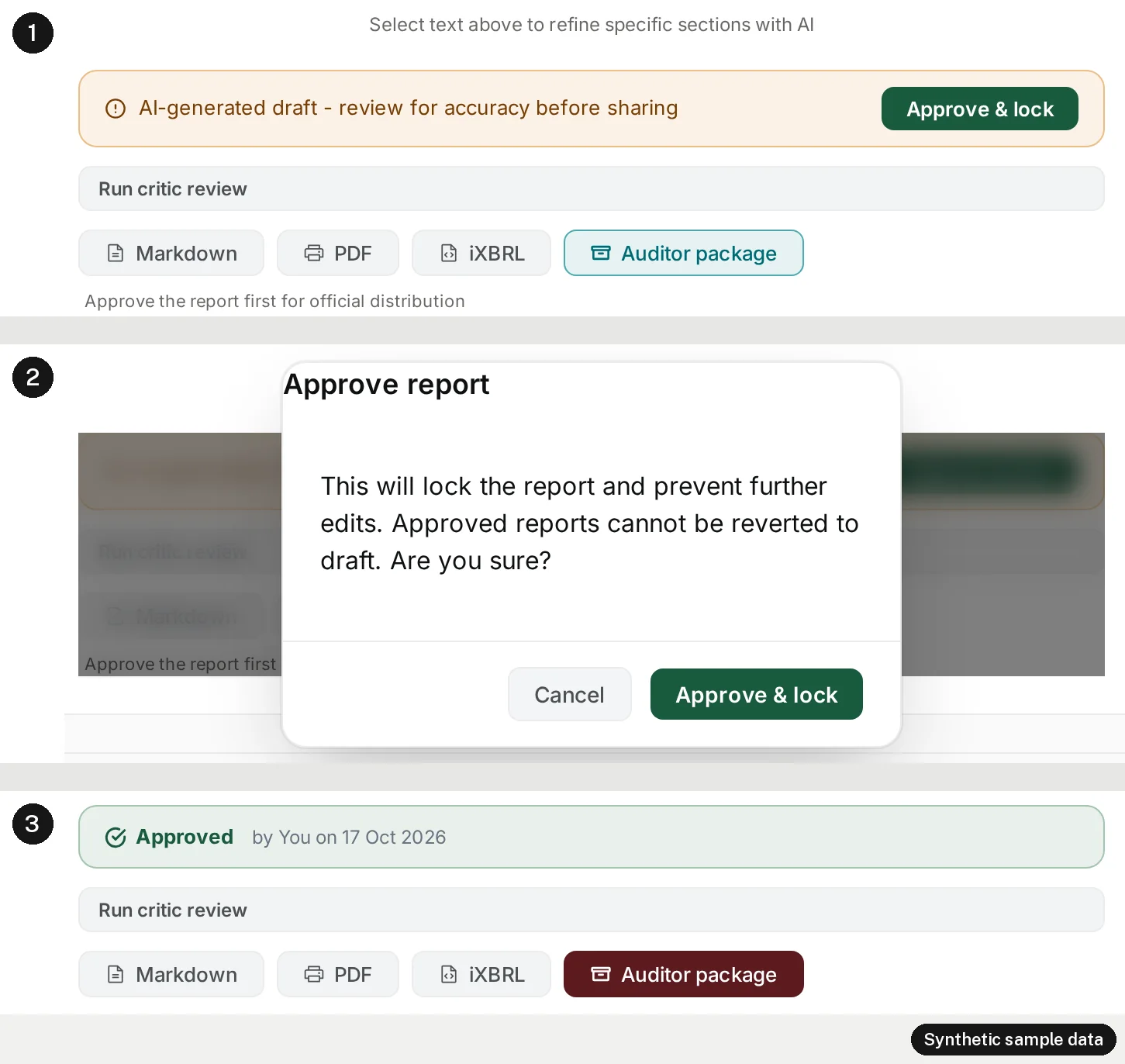
The server holds the same line as the screen. It refuses to approve a draft that still has a citation the check rewrote, and it refuses to approve a report twice. Who decides what, then:
| Decision | Who makes it | What Evenhall does about it |
|---|---|---|
| What the draft says | The model, from the data block and its tool results | Sends the report, drops the notes it recognises, keeps both in the record |
| Whether each cited methodology exists | Evenhall’s check, after the run | Rewrites an unknown citation to [ungrounded], and refuses approval while any remain |
| Whether the draft is right | The manager | Marks the draft as AI-generated and asks for review before sharing |
| Whether it becomes the company’s report | The manager | Approves only after a confirmation, then locks the report |
| Who can read it | The manager | Creates a public link only for an approved report, and removes it when the manager stops sharing |
The AI SDK’s work ended in stage 3. Nothing it returns can approve a report, and Evenhall creates a public link only for a report the manager has approved.
Stage 5: the finished report, and sharing it
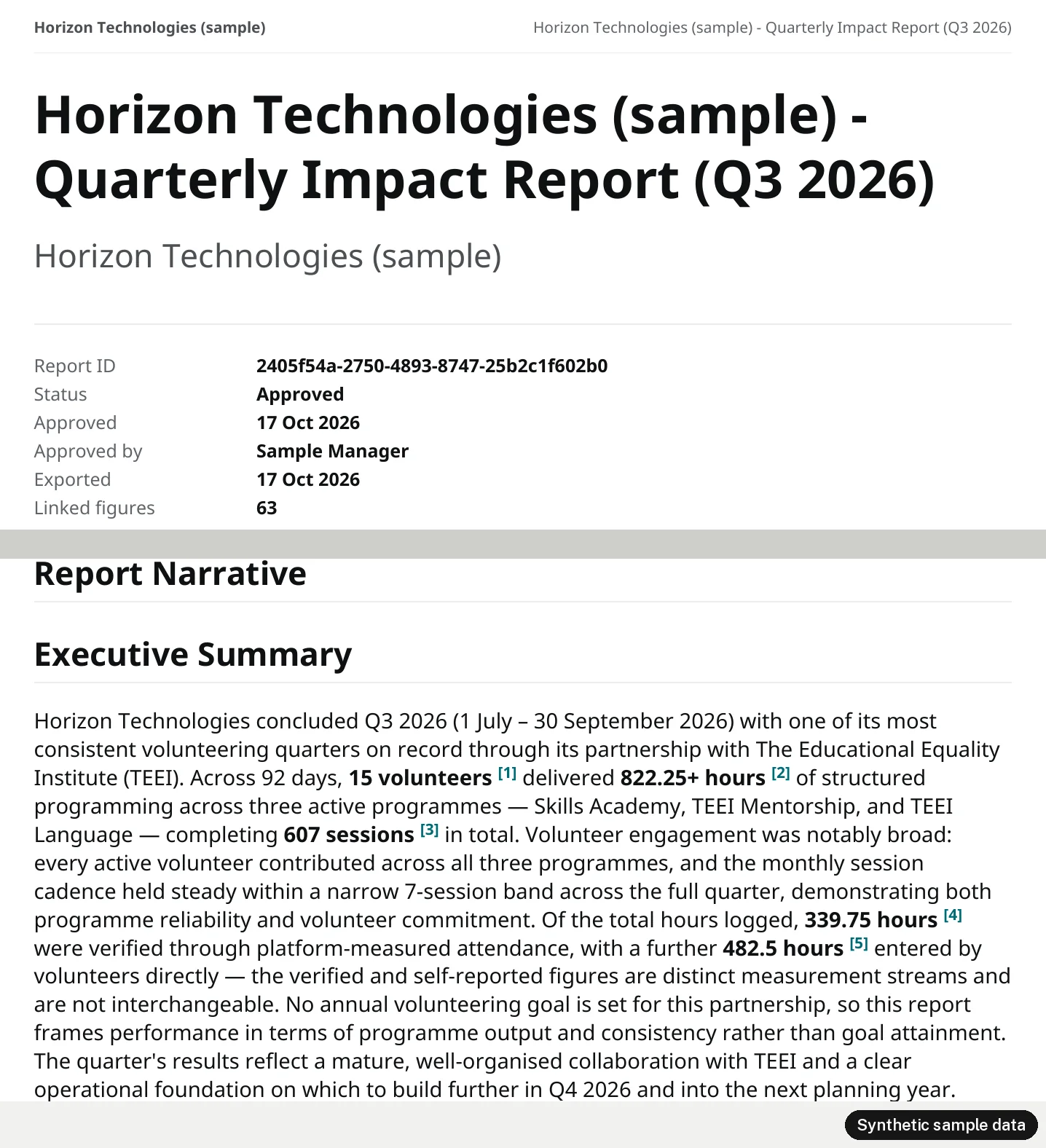
The approved report opens in Evenhall’s viewer, with a contents list, the report and its details, and the ways it can leave Evenhall: a PDF, a public link, sharing with an auditor, email, print and plain text.

In the PDF, each inline citation becomes a numbered note, and the first page records the report’s id, its status, who approved it and when, and how many figures it links to a source: 63, one for each citation in the draft.
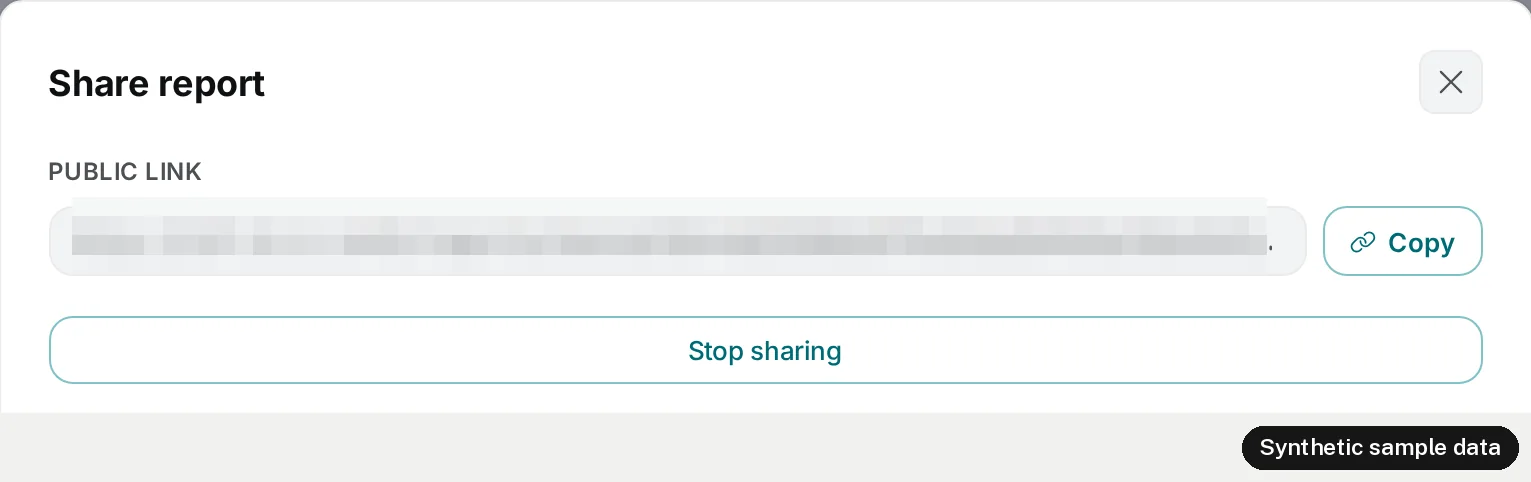
Sharing works the same way. The share button on a draft says “Approve this report before sharing a public link.”, and the server refuses to create a link for a report that is not approved. For an approved report, the manager gets a public link to copy and a Stop sharing button, which removes the link.

On a phone, in Evenhall’s public demo, the end of the journey looks like this:

What a partner company does with the report is in From a Verified Hour to a Report You Can File, and how partnership works from the company’s side is in How Corporate Volunteering Works at TEEI.
Running it on Cloudflare Workers
The AI SDK needs nothing from Vercel to run. Evenhall is a Worker with Node.js compatibility turned on, and the SDK and its Bedrock provider are bundled into it. The Bedrock and Google providers both accept a fetch, and we give each one our own, which records every model call in our traces with its request id and provider, and for Bedrock the model and the region. The response-header times quoted above came from those records.
The local copy ran the same Worker code in workerd, Cloudflare’s open-source Workers runtime, through the Cloudflare Vite plugin. So the sample run went through the same runtime as production, on a different machine and network, with local databases in place of ours.
How the rest of Evenhall runs on Workers, with its queues and scheduled jobs, is in How TEEI Runs Its Platforms on Cloudflare Workers.
What we measured, and what we have not
We made two report runs against Bedrock for this article, and one request that the cache answered. The second run is the one shown above. The first used the same report type and the same data:
| Run 1 | Run 2, shown above | |
|---|---|---|
| Model steps | 3 | 4 |
| Tool calls | 7, then 9 | 7, then 6, then 6 |
| Notes written, and dropped | 3 of 3 | 4 of 4 |
metadata frame | 0.70 s | 0.46 s |
| First text frame | 10.06 s | 11.24 s |
| Last text frame | 68.05 s | 66.88 s |
done frame | 76.92 s | 79.21 s |
| Text frames | 76 | 64 |
| Cited figures recorded after the stream | 40 | 63 |
| Tokens, input and output (SDK count) | 21,274 and 6,123 | 29,523 and 6,380 |
Asked a third time, for the same type and data as run 1, Evenhall answered from its cache in 0.33 seconds, with no model call.
We have not measured how long drafts take in production, how often the model writes notes there, how many drafts companies have generated, or what a draft costs. We have not evaluated drafts against reference reports. Two runs on one machine show how the parts fit together and where the time goes; they are not a benchmark.
Verify this
You can reproduce both the problem and the filter with the SDK’s own mock model (testing in the AI SDK). In an empty folder, run npm init -y, set "type": "module" in package.json, run npm install ai@7.0.92 zod@4.5.4, save this as repro.mjs and run node repro.mjs. It needs no key and no network.
The first step contains a note and a tool call. The second contains the report. The filter at the bottom is a short version of ours: it knows headings but not our section markers, closes a block only on two newlines in a row, and drops whatever it still holds if the stream ends without a finish-step.
Written for this article.
import { streamText, tool, isStepCount, simulateReadableStream } from 'ai';
import { MockLanguageModelV4 } from 'ai/test';
import { z } from 'zod';

const usage = {
  inputTokens: { total: 10, noCache: 10, cacheRead: 0, cacheWrite: 0 },
  outputTokens: { total: 20, text: 20, reasoning: 0 },
};

// One model step: text deltas, an optional tool call, then finish.
function step(deltas, reason, toolCall) {
  const chunks = [
    { type: 'stream-start', warnings: [] },
    { type: 'text-start', id: 't' },
    ...deltas.map((delta) => ({ type: 'text-delta', id: 't', delta })),
    { type: 'text-end', id: 't' },
    ...(toolCall ? [toolCall] : []),
    { type: 'finish', usage, finishReason: { unified: reason, raw: undefined } },
  ];
  return { stream: simulateReadableStream({ chunks }) };
}

// Step 1 is working notes and a tool call. Step 2 is the report.
const model = () =>
  new MockLanguageModelV4({
    doStream: [
      step(["I'll check how hours are counted before writing. ", 'Let me look that up.\n\n'], 'tool-calls', {
        type: 'tool-call', toolCallId: 'c1', toolName: 'lookupMethod', input: '{"slug":"volunteer-hours"}',
      }),
      step(['## Volunteer time\n\n', 'Hours are counted per session ', '[ref:volunteer-hours].\n\n',
        '## Next step\n\n', 'A manager reviews this draft before it is filed.\n'], 'stop'),
    ],
  });

const tools = {
  lookupMethod: tool({
    description: 'Look up how a figure is calculated',
    inputSchema: z.object({ slug: z.string() }),
    execute: async ({ slug }) => ({ slug, formula: 'sum of session hours' }),
  }),
};

const run = () => streamText({ model: model(), prompt: 'Write the report.', tools, stopWhen: isStepCount(2) });

// Forward report text only: drop steps that call a tool, hold text until the
// first heading, then release everything up to the last closed paragraph.
const HEADING = /^#{1,3}\s/m;
async function* reportOnly(parts) {
  let buf = '', started = false, streaming = false, toolCalled = false;
  for await (const part of parts) {
    switch (part.type) {
      case 'start-step':
        buf = ''; streaming = false; toolCalled = false;
        break;
      case 'text-delta': {
        if (toolCalled) break;
        buf += part.text;
        if (!started) {
          const at = buf.search(HEADING);
          if (at < 0) break;
          buf = buf.slice(at); started = streaming = true;
        }
        if (!streaming) break;
        const end = buf.lastIndexOf('\n\n') + 2;
        if (end > 1) { yield buf.slice(0, end); buf = buf.slice(end); }
        break;
      }
      case 'tool-call':
        toolCalled = true; buf = '';
        break;
      case 'finish-step':
        if (!toolCalled && buf.trim()) { started = true; yield buf; }
        buf = '';
        break;
      case 'error':
        throw part.error;
    }
  }
}

let all = '';
for await (const text of run().textStream) all += text;
console.log('--- result.textStream ---\n' + all);

const result = run();
const sent = [];
for await (const chunk of reportOnly(result.stream)) sent.push(chunk);
console.log('--- reportOnly(result.stream) ---\n' + sent.join(''));
sent.forEach((chunk, i) => console.log(`chunk ${i + 1}: ${JSON.stringify(chunk)}`));

const steps = await result.steps;
console.log(`steps: ${steps.length}, tool output: ${JSON.stringify(steps[0].toolResults[0].output)}`);
We ran it on 17 October 2026 at 14:12 UTC with Node 22.23.2, ai 7.0.92 and zod 4.5.4. The output:
--- result.textStream ---
I'll check how hours are counted before writing. Let me look that up.

## Volunteer time

Hours are counted per session [ref:volunteer-hours].

## Next step

A manager reviews this draft before it is filed.

--- reportOnly(result.stream) ---
## Volunteer time

Hours are counted per session [ref:volunteer-hours].

## Next step

A manager reviews this draft before it is filed.

chunk 1: "## Volunteer time\n\n"
chunk 2: "Hours are counted per session [ref:volunteer-hours].\n\n"
chunk 3: "## Next step\n\n"
chunk 4: "A manager reviews this draft before it is filed.\n"
steps: 2, tool output: {"slug":"volunteer-hours","formula":"sum of session hours"}
textStream has the note on its first line; the filtered stream starts at the heading and arrives in four blocks. We also ran this stream through our production filter, with four harder ones: a step with no heading, a lead-in before the heading, a note after a sent paragraph, and a note finished as its own paragraph before a tool call. Both filters sent the same chunks for all five.
- Read
streamTextand tool calling in the AI SDK documentation, and the Amazon Bedrock provider. - Read how TEEI turns Amazon Chime SDK events into verified hours, where the figures in these drafts begin.
- Read What TEEI Runs on AWS, including the AI checks that call Amazon Bedrock without the AI SDK.
- See Evenhall for how companies take part in TEEI’s programmes.
- If you are building with TEEI, talk to us and we will walk you through the code.
Frequently asked questions
What does the Vercel AI SDK do in Evenhall?
It runs the model part of a report draft: the calls to Claude on Amazon Bedrock, the tool calls with their schemas, the loop of steps, and the typed stream of parts that our filter reads. The data, the prompt, the filter, the stream to the browser, the checks, the approval and the sharing are Evenhall code.
Is TEEI hosted on Vercel?
No. The AI SDK is an open-source TypeScript library. Evenhall runs on Cloudflare Workers, the SDK runs inside that Worker, and the model runs on Amazon Bedrock.
Does all of TEEI's AI run on the AI SDK?
No. This is one integration in Evenhall. The AI checks in our programmes call Amazon Bedrock from AWS Lambda through the AWS SDK.
Does the model write the final report?
It writes a draft. A manager reads it and approves it, and approval locks it. A draft that cites a methodology missing from the registry cannot be approved, and only an approved report can get a public link.
Which model writes the drafts?
Claude Sonnet 4.6 on Amazon Bedrock, through an EU cross-Region inference profile, for every report type except the weekly summary, which runs on a faster tier.
Is the company in the screenshots real?
No. Horizon Technologies (sample) is a company we invented, with synthetic volunteers and figures, in a local copy of Evenhall. The model calls were real.
Can I run the example without an API key?
Yes. It uses the mock model that ships with the AI SDK, so it needs no key and no network. Install ai@7.0.92 and zod@4.5.4 and run it with Node.