Give Ukrainians free language practice, career support and courses.
Some need more chances to speak a new language. Others want to use their work experience in a new job. At TEEI they practise with a volunteer, get support from a mentor, one to one on video, and build skills in TEEI Skills Academy.
You share the offer. The participant chooses who to talk to. We run the programmes.
Next conversationtoday·…conversations completedSource ↗
Three programmes · all of them free
Which one fits whom?
Ask yourself whether the person mainly needs to speak the language they are learning more often, to find work that uses the experience they have, or to learn something specific and have proof of it. That decides which of the three programmes you share.
TEEI Languageby TEEI
Needs more chances to speak the language they are learning.
Language practice with volunteers. Practise speaking a language in free video conversations, one to one or in groups. The participant chooses who to talk to, books their own conversations and can join Speaking Cafés and other language groups.
Languages
The platform in Ukrainian, Norwegian, English and Polish
Account
The participant signs up on their own, 18 or older
Suits
Anyone who wants to practise speaking, at any level
Wants to use their experience and take the next step in their career.
Career support. Video calls with a volunteer mentor who has relevant work experience: CVs and interviews, career choices, skills development and professional guidance, or the next step towards a job where their experience counts.
Languages
The platform in English and Ukrainian
Account
The participant signs up and chooses a mentor on their own
Suits
Adults with education or work experience they want to put to use
Wants to learn new skills through courses, practice and experts.
Courses, certificates and expert teaching. Courses from DataCamp and Google Career Certificates on Coursera. Live teaching by professionals from companies, universities and other organisations: TEEI-approved instructors lead workshops, clinics, expert Q&As, webinars and classes.
Languages
The platform in English and Ukrainian. The language depends on the course
Account
The same account as TEEI Mentorship. The participant signs up on their own
Suits
Adults who want to build professional skills, learn new tools or gain further qualifications
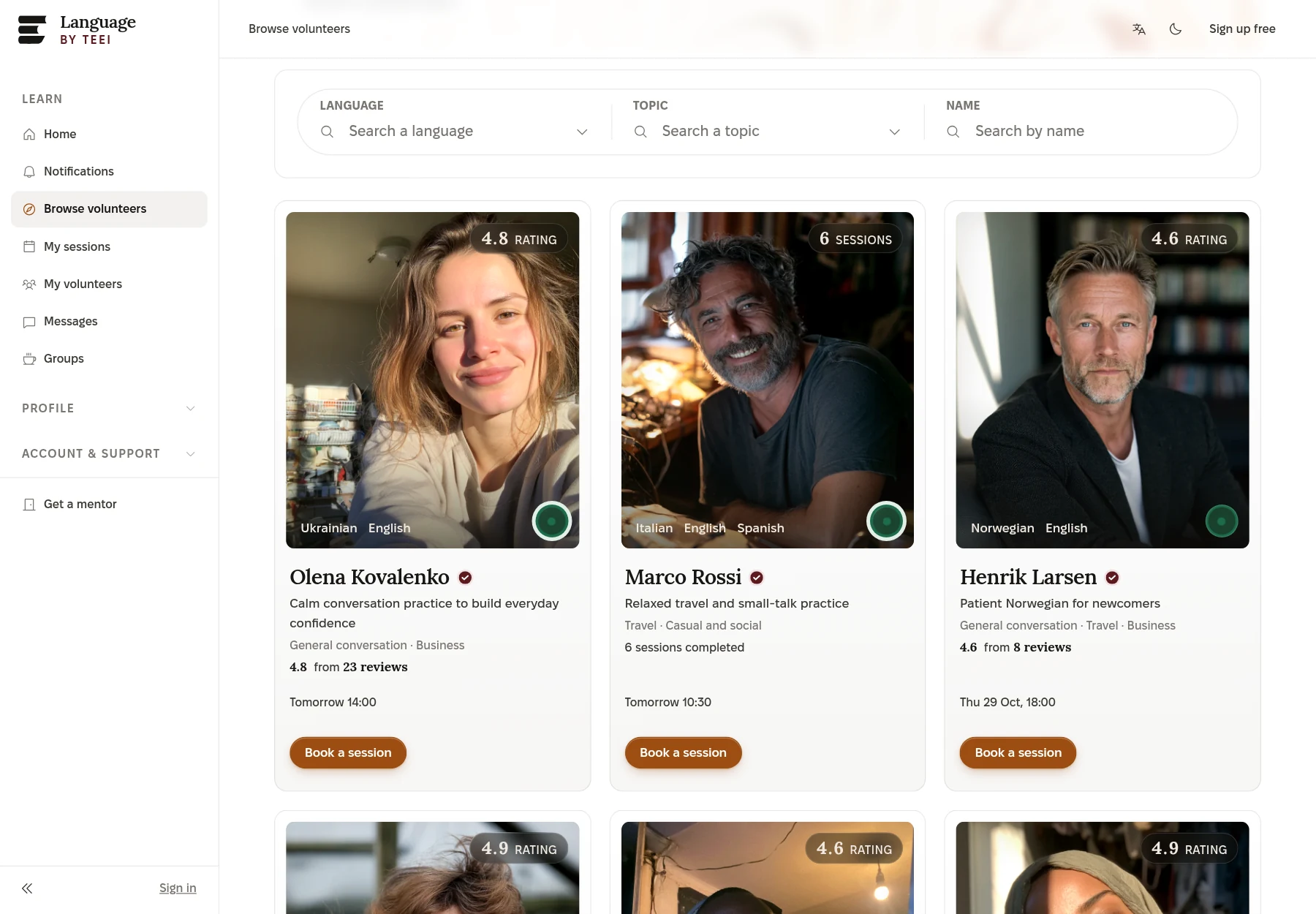
Find a volunteer. The participant searches by language, topic or name and sees a card for each volunteer, with languages, rating and next available time.
Understanding a language is not the same as feeling confident using it. TEEI Language gives the participant the chance to practise through conversations with a volunteer who speaks the language they are learning.
The conversations can be about everyday life, work, appointments or whatever the participant wants to practise. They choose who to contact, and book a single conversation or regular meetings on video.
This is speaking practice alongside other language learning. Languages and meeting times depend on which volunteers are available. The platform can be used in Ukrainian.
Signs up on their ownFree account, 18 or older. Sign in with a link by email, no password.
02
I’m practisingEnglish · B1WorkEveryday life
Sets up their profileLanguage, level, goals and the topics they want to talk about.
03
English · WorkMMoira SinclairVolunteer · 4.9 · today 15:00
Finds a volunteerFiltered by language and topic. Every volunteer is assessed and approved by TEEI before they can offer conversations.
04
Fri 16 Oct15:0030 minConfirmed
Books a conversationA request or a direct booking. 30, 45 or 60 minutes, once or at a regular time every week.
05
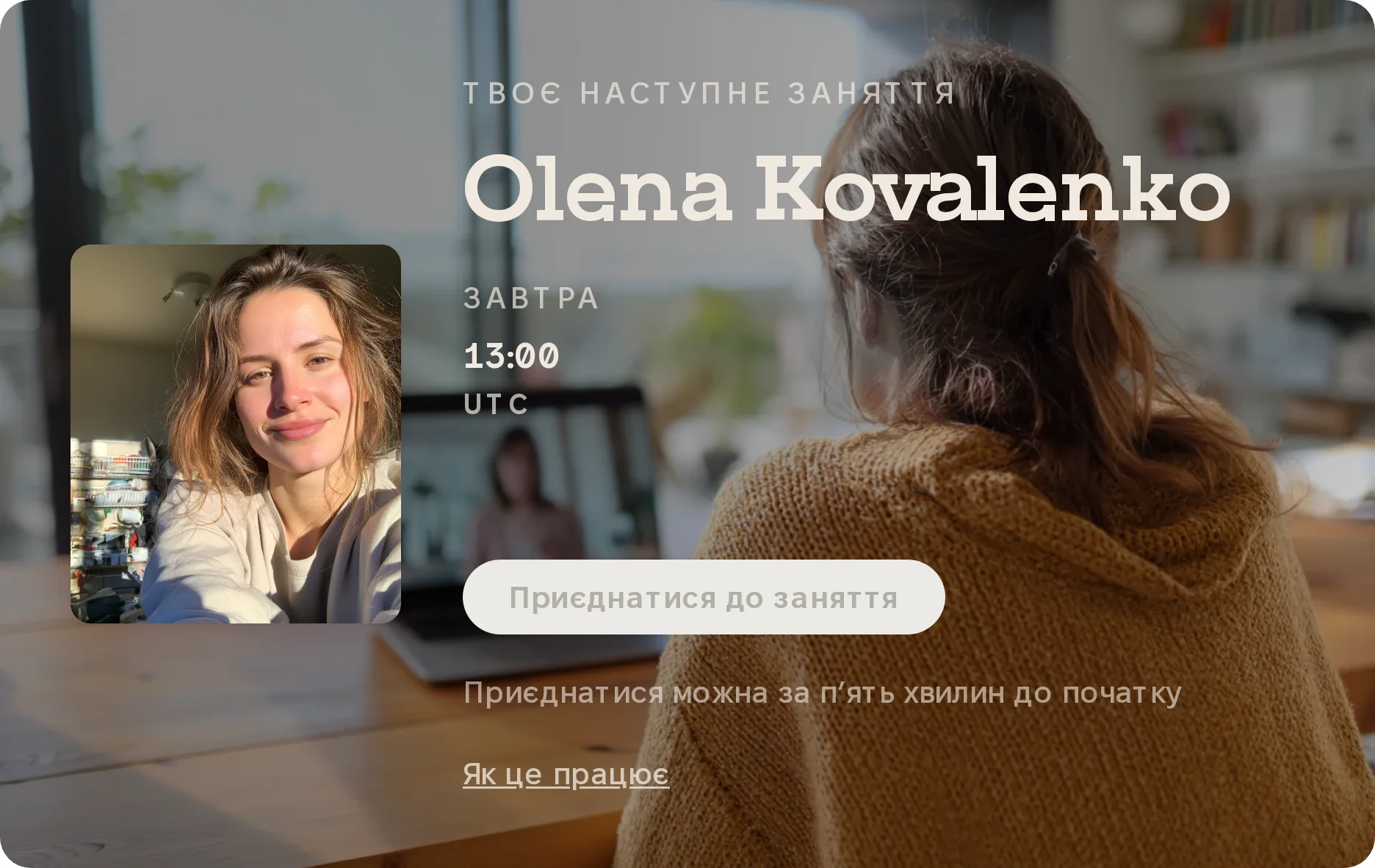
In 1 hourConversation with Moira, 15:00
Gets a reminderIn the app and by email, about a day and an hour before.
06
Join roomOpens 14:55 · 30 min
Meets on videoIn the browser, nothing to install. The room opens five minutes before, and only the two of them are in it. Works on a phone.
07
★★★★★ 5 conversations
Rates the conversationOne click afterwards. The conversations are counted, and the participant earns badges at 2, 5, 10 and 25 conversations.
Work experience to build on.
Information about the programme is available in Ukrainian. The platform can be used in English and Ukrainian.
A person can have many years of experience and still need help presenting it in a new job market. TEEI Mentorship gives practical career support from a volunteer mentor with relevant work experience.
The participant can get help with their CV, practise for an interview or talk through the next step towards a job where their experience counts. They choose a mentor themselves and book video calls around what they want to work on.
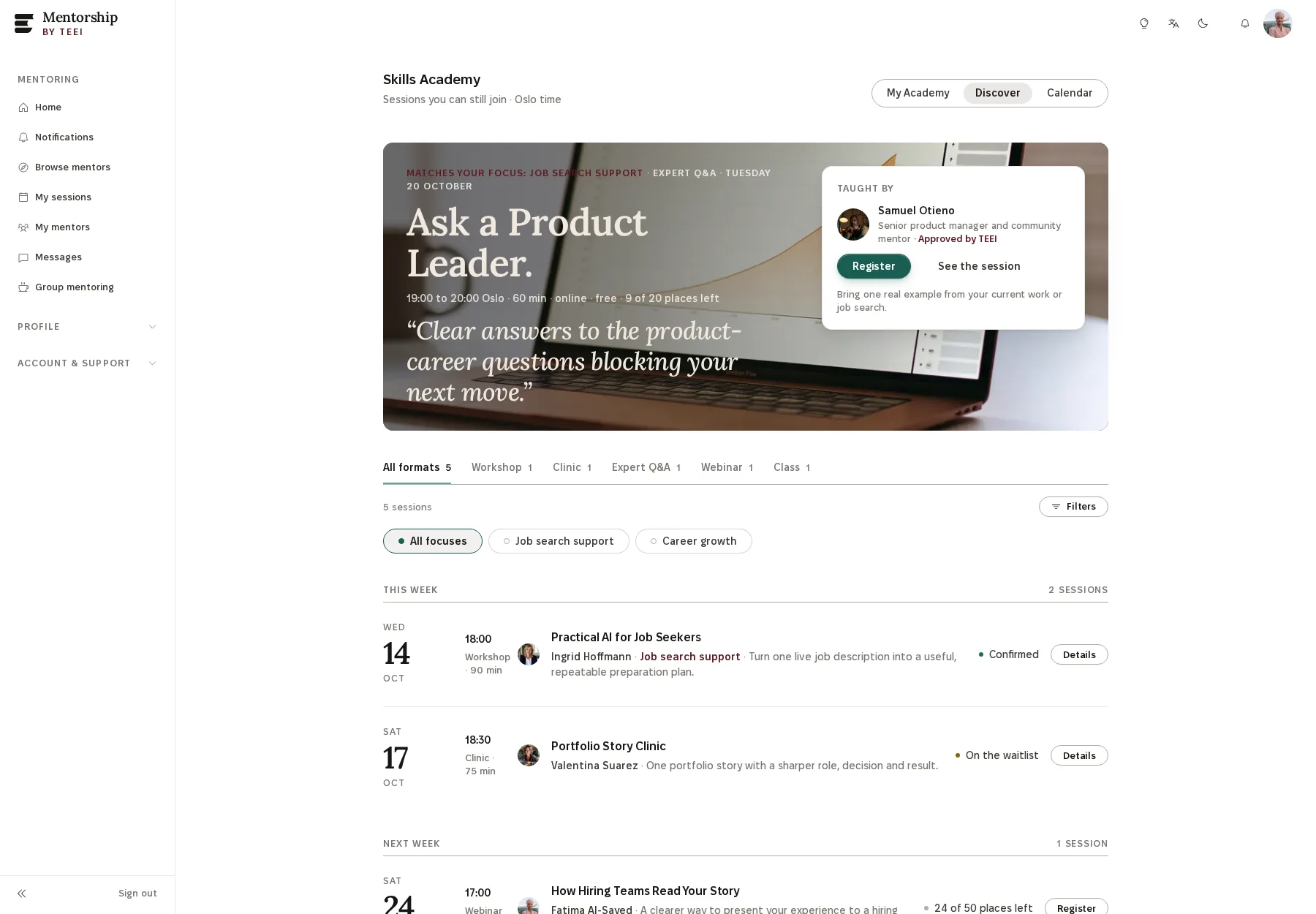
The Skills Academy front page. Part of the mentoring platform, with the same sign-in. Live teaching with instructors TEEI has approved, and courses from DataCamp and Coursera. Everything the participant has signed up for is gathered under My Academy.
Signs up on their ownFree account on the mentoring platform. Sign in with a link by email, no password.
02
PrivateFinanceProductRemote
Fills in the career profileBackground, industry and goals. The profile is private and is not shown to the mentor.
03
ProductMMiguel TorresMentor · 4.8 · Tue 18:00
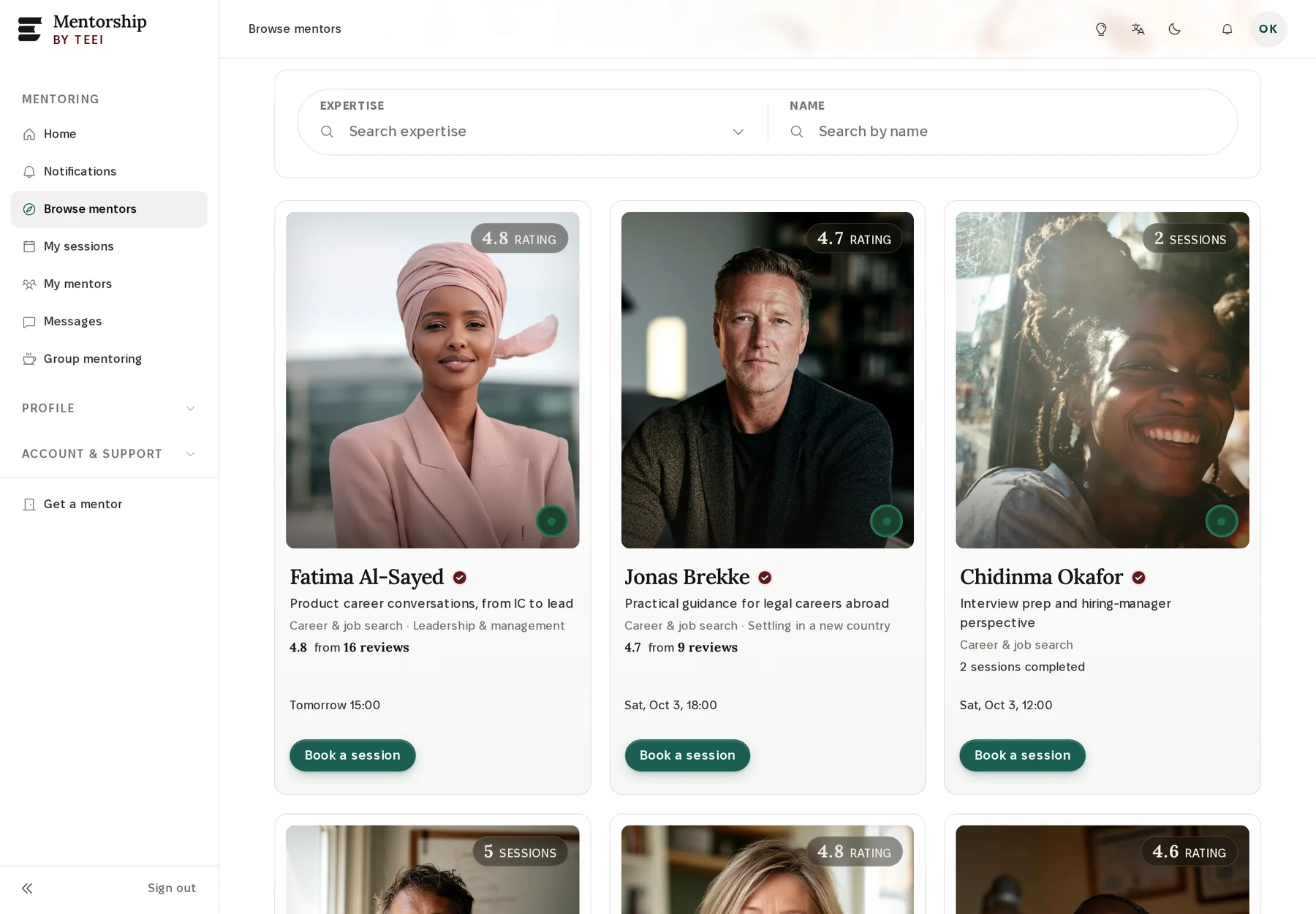
Chooses a mentorFrom mentors TEEI has approved, by field and experience.
04
Tue 20 Oct18:0045 minConfirmed
Books a video callRequest a session or book one of the mentor’s available times.
05
Join the roomOpens 17:55 · 45 min
Meets on videoIn the browser. CV, interview practice, job search or next steps, whatever the participant wants to work on.
06
★★★★★ Career Fellow · 5
Builds on itRatings, messages and hours are gathered in one place. Career Fellow badges at 2, 5, 10 and 25 sessions.
The organisation
TEEI stands behind the offer.
You share the offer. TEEI runs the platforms and looks after the programmes.
Before a conversation
Volunteers and mentors must be approved for the programme before they can offer conversations.
The participant’s choice
The participant chooses who to contact and arranges the meetings directly. They can block anyone they do not want further contact with.
If something is not right
The participant can report it to TEEI from the platform. The report goes to our team, who look into it and follow it up.
What the participants take with them
Proof to carry forward.
The participants you refer can reach levels, earn certificates, add them to LinkedIn and share their own story. Issued by TEEI, each with its own credential ID.
Credentials
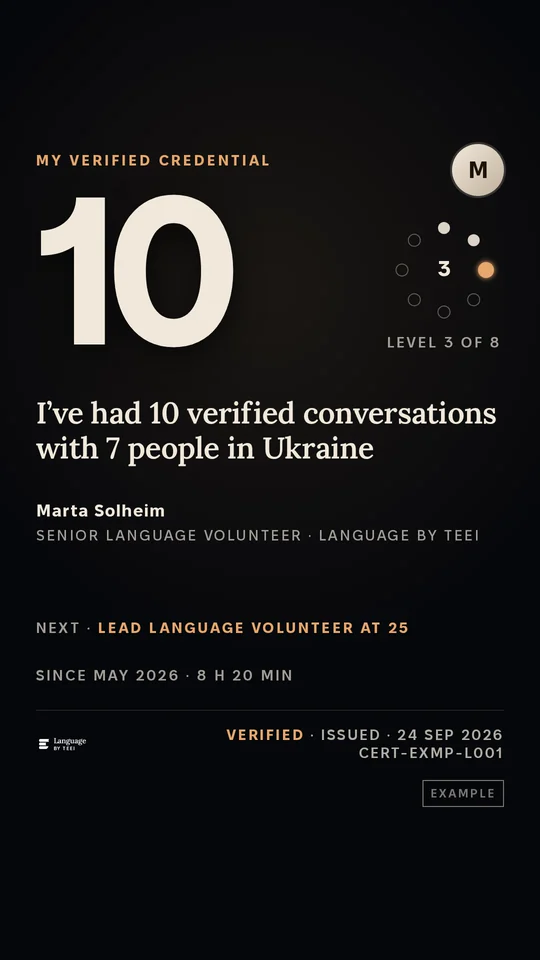
Every completed conversation counts toward a Language credential.
Olena · 12
2
5
10
25
50
100
200
500
Level 3 of 8Dedicated Language Learner · 12 verified conversations
Each level gives a badge and a LinkedIn entry under Licenses & certifications, with TEEI as the issuer. A printable hours statement and a public page anyone can check by its code come with it.
Story cards and story videos
A conversation, ready to share.
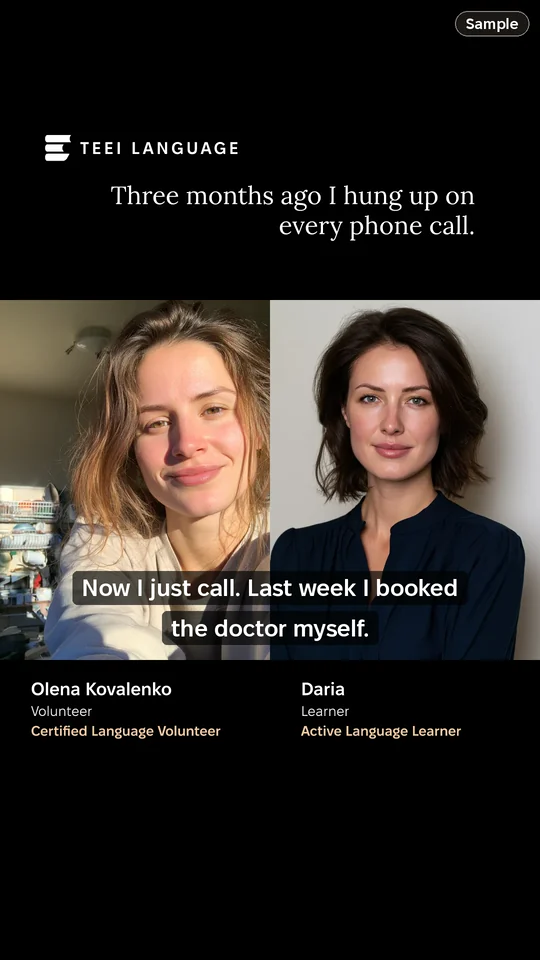
After a conversation, a card is ready in the app: a line on the map from your city to your partner’s, how many conversations you’ve had, or a sentence in your own words. You can also record a story video in the app, on your own or together during a session in TEEI’s video room.
Yours to share. You share from your own phone, as a Story or a post. TEEI never posts for you.
Everyone agrees first. A video is shared only when everyone in it has approved that version.
Made from real conversations. Every card comes from a verified conversation.
Sample
9:41
Mmarta2h
Send message
Instagram Story
9:41
FollowingFor You
+12812931
@daria
Now I just call. Last week I booked the doctor myself.
Original sound · daria
HomeFriendsInboxProfile
TikTok, in the For You feed: the same story video posted by daria, with the caption Now I just call. Last week I booked the doctor myself. Sample data.
9:41
DariaPharmacist · Kyiv2h ·
Three months ago I hung up on every phone call. Now I just call. Last week I booked the doctor myself.
1:48
243 comments
LikeCommentRepostSend
HomeMy NetworkPostNotificationsJobs
LinkedIn post by Daria, pharmacist in Kyiv: Three months ago I hung up on every phone call. Now I just call. Last week I booked the doctor myself. With the story video, 1:48, Olena Kovalenko and Daria side by side. Sample data.
Instagram Story, as a follower sees it
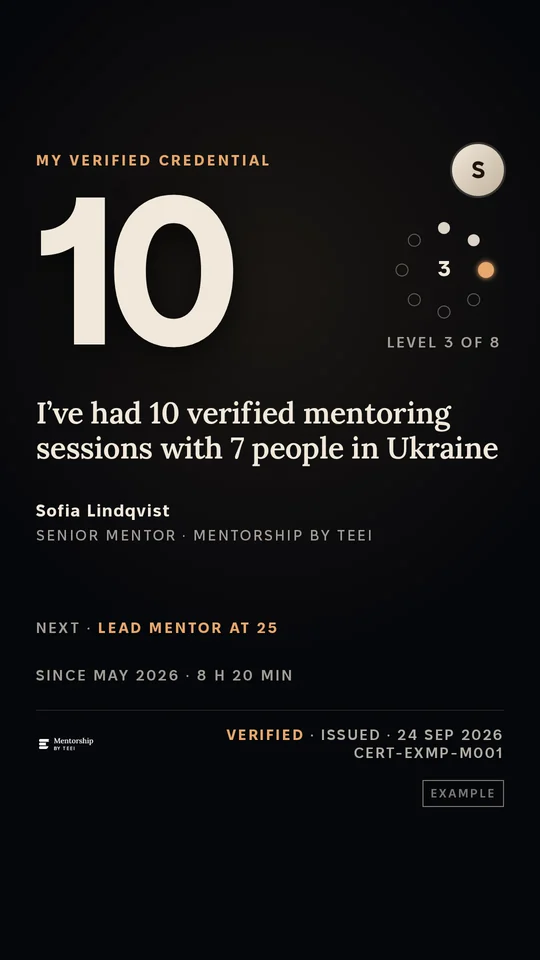
Credentials
Every mentoring session counts toward a Mentorship credential.
Olena · 6
2
5
10
25
50
75
100
150
Level 2 of 8Career Fellow · 6 verified mentoring sessions
Each level gives a badge and a LinkedIn entry under Licenses & certifications, with TEEI as the issuer, and a public page anyone can check by its code.
Story cards and story videos
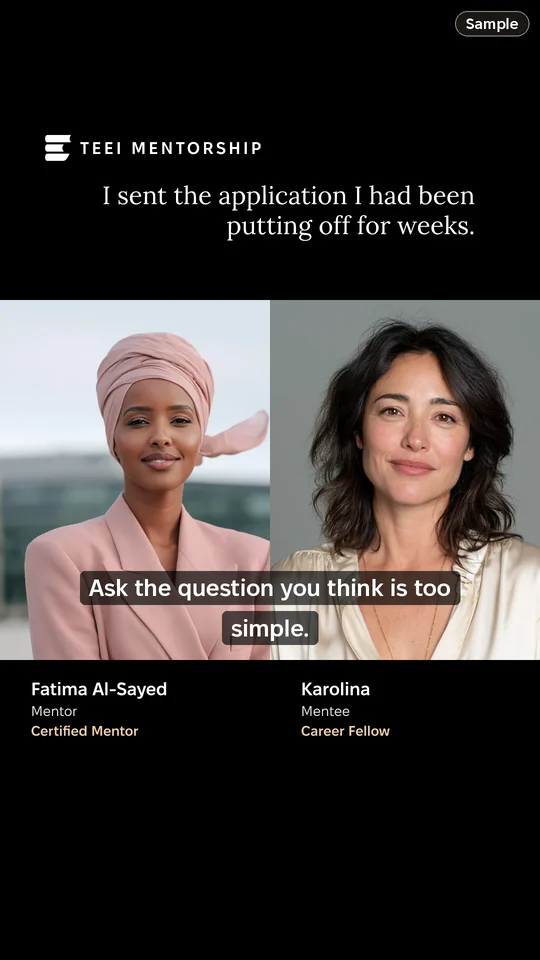
A mentoring conversation, ready to share.
A story video is recorded in the app on your own, or together with your mentor or mentee during a session in TEEI's video room. The TEEI mark, the sentence you chose, and each person's name and role are set into the file itself.
Yours to share. You share from your own phone, as a Story or a post. TEEI never posts for you.
Everyone agrees first. A video is shared only when everyone in it has approved that version.
Sample
9:41
KarolinaProduct designer · Kyiv2h ·
I sent the application I had been putting off for weeks. Ask the question you think is too simple.
1:48
243 comments
LikeCommentRepostSend
HomeMy NetworkPostNotificationsJobs
LinkedIn post by Karolina, product designer in Kyiv: I sent the application I had been putting off for weeks. Ask the question you think is too simple. With the story video, 1:48, Fatima Al-Sayed and Karolina side by side. Sample data.
9:41
Ssofia2h
Send message
Instagram Story
9:41
FollowingFor You
+12812931
@karolina
I sent the application I had been putting off for weeks.
Original sound · karolina
HomeFriendsInboxProfile
TikTok, in the For You feed: the same story video posted by karolina, with the caption I sent the application I had been putting off for weeks. Sample data.
LinkedIn post, dark mode
Credentials
A class ends in a certificate issued by TEEI.
Mon 28 SepMeeting 1
Mon 5 OctMeeting 2
Mon 12 OctMeeting 3
Mon 19 OctMeeting 4
Tue 20 OctConfirmed
A class runs two to six sessions with the same group. When the teaching team confirms completion, TEEI issues the certificate, with a badge and a LinkedIn entry under Licenses & certifications. Course certificates from DataCamp and Google on Coursera are issued by the course provider, not by TEEI.
In their own words.
Participants and volunteers, in their own recordings.
Original recording0:50
TEEI Language
English helped me at work…Before, for me, needs a translator.Now, I don’t use it.
Landscape image · 1600 × 900 pxA4 · download as PDF or print
From
TEEI <hello@theeducationalequalityinstitute.org>
To
each address on your list, one email each
Subject
The email itself, as TEEI sends it. Your organisation’s name and introduction come in when you add them under “Add your organisation”. The stop link at the end is personal to each recipient.
The image has no link. Share it together with the message and the programme link.
Or let TEEI send it
Send this email to your list
TEEI sends one email per address, from TEEI, with the message above, the optional name you add and a link to stop. You check the list before anything goes out. The addresses are used for this sending and for nothing else.
One per line, or separated by commas. A name in front of the address is fine.
or
Choose a CSV fileExported from your mailing tool or spreadsheet. The column with the addresses is found for you; you confirm it when it is unclear.
Will be sent
Not an address
Same address twice
Left out by you
The email for this material is not written in this language yet. Copy the text and download the image for your own tool, or share in Ukrainian or English.
The message changed after the list was checked: you edited the organisation’s name or the choice of offers. Look at the email again, then send.
Your choices changed while the list was being checked. Nothing was sent. Check the list again.
This sending was already handed to TEEI with a different message. Nothing new was sent. Start a new sending if you want to send this one.
There is no address to send to. Paste at least one, or choose the right column.
TEEI could not be reached. Nothing was sent. Your addresses are still here: try again.
Your time on this page has run out. Nothing was lost: your addresses are still here. Check the list again to continue.
Handing over
Checking the list with TEEI…
Keep the page open until this changes. Nothing is sent twice if you reload.
TEEI sends them in the background; a long list takes a while. Addresses that have asked TEEI to stop, or that bounced before, are skipped on the way.
This page does not show what happened to each address. Signed in to TEEI Network Workspace, your organisation sees delivered, delayed and not delivered.
Send the message in the channel you usually use with the person.
A short presentation with real platform screens and QR codes. Open the tour when you want to show more.
Five views · use the arrow keys to move between them · Escape closes the presentation. The QR codes carry the same organisation links.
TEEI Network Partners · For your organisation
See what your sharing leads to.Bring your own people in as volunteers.
Register your organisation and you get your own links and an overview in TEEI Network Workspace. There you see how many people have signed up through you, booked conversations and completed them, programme by programme. Your own staff and volunteers can also take part as conversation partners, mentors and teachers. Registration is optional. You can share the programmes without registering your organisation.
Register in minutesRegister your organisation and you have your own links and the overview in TEEI Network Workspace.
Counted per programmeLanguage and Mentorship: sign-ups, booked and completed conversations. Skills Academy: sign-ups, reserved places, attendance and confirmed class completions.
Send the Ukrainian message in the channels you already use. Everyone who signs up through your link is credited to your organisation, programme by programme. So are the sessions your own people give.
Your message as received, in Ukrainian
Рекомендує · Ваша організація
Вітаю! Ділюся інформацією про можливість безкоштовно практикувати мову онлайн у TEEI Language.
TEEI LanguageПрактикуйте мову у відеорозмовах із волонтерами. Самостійно обирайте співрозмовника та зручний час серед доступних варіантів.
Програми проводить неприбуткова організація TEEI в межах ініціативи «Разом для України» (Together for Ukraine). Участь безкоштовна для людей з України віком від 18 років – в Україні та за кордоном. Інтерфейси платформ доступні українською.
The overview shows what happened to the people you sent: how many confirmed their account, booked a session and completed it, by programme and period, compared with the same period before. TEEI records the activity. You don’t need to keep records of your own.
OverviewThe numbers, the period and the comparison
Getting startedChoose how you take part
ProgrammesOne choice per programme
Sharing toolsLink, QR and ready-made messages
Request a private classSkills Academy for your group
Contribute a classYour own people teach
ParticipantsStatus per person, names only with consent
ReportPeriods, summary, print and PDF
TeamInvite colleagues
Profile & settingsPartner code and sharing profile
TEEI Language, TEEI Mentorship and TEEI Skills Academy are three programmes on digital learning and teaching platforms; Mentorship and Skills Academy share a platform and an account. TEEI runs the rooms. You share the links, and your own people can be volunteers, mentors and teachers in them.
One choice per programmeOn the Programmes page you choose, programme by programme, whether you take part.
A participant link and a link for your own peopleBoth are ready on the same page, with a preview of what they will see.
Request a private classYour group takes part, TEEI finds the teacher and sends the private link.
TEEI Skills AcademyCourses, workshops and classes · free · on video in the browsertheeducationalequalityinstitute.org/…?partner=‹code›
Opened by the participant. Credited to you, per programme.
TEEI Network WorkspaceProgrammesSample
Assistant
Ask, and it shows you.Request, and it does it.
The assistant answers from TEEI’s help pages and from your workspace. Ask where something is, and it highlights the place on the page and offers to take you there. Ask it to do something, and it fills in and carries it out once you have confirmed. Nothing is sent before you have confirmed.
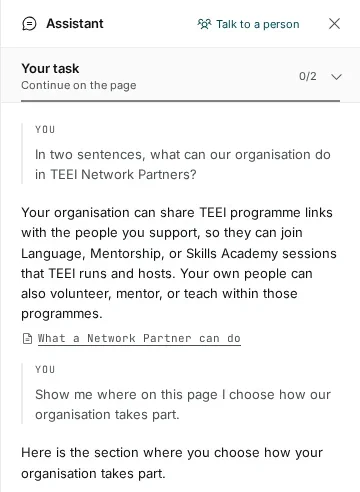
A question and the answer
You
Where on this page do we choose how our organisation takes part?
Assistant
Here is the section where you choose how your organisation takes part. Shall I take you there?
If you would rather talk to a person, that button is at the top of the panel.
The Report page brings together what the overview shows, for the period you choose. “Partnership to date” shows the hours and sessions your own people have given, and how many people learned, per programme.
PeriodsMonth, three months or year to date, against the same period before.
Summary and PDFCopy a ready-made summary into an email or a board paper, print it, or save it as PDF.
Names only with consentThe report shows names only where the person has given consent.
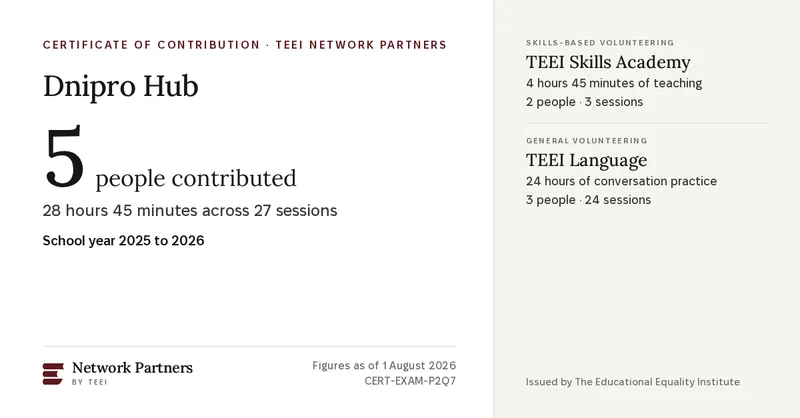
Every school year your organisation gets a certificate of contribution: how many of your people contributed, hours and sessions, per programme. The certificate comes with images for LinkedIn, an A4 page to print and a badge for your website.
The verification addressAnyone can open it and see that the certificate is genuine and current.theeducationalequalityinstitute.org/verify/‹code›
Register your organisation, choose programmes, share the link. Registration is optional. You can share the programmes without registering your organisation.


 TEEI Languageby TEEI


 +